
Updated January 2026
Quick summary
To find customer questions for your blog, research what your audience is already asking by using tools like Google Search suggestions, “People also ask,” forums, Q&A sites (e.g., Reddit, Quora), keyword research tools, social media comments, and customer service queries so you can create content that directly answers real questions people are searching for.
How to find customer questions for your blog, Jan 2026 Update
The fastest way to come up with blog ideas that actually bring enquiries is to write about the questions people already ask before they buy. In 2026, you can pull these questions from search data, real conversations, and community platforms, then turn them into clear posts that answer one problem at a time.
Start with real customer language
- Write down every question you get in enquiries, DMs, calls, and emails: The “small” questions are usually the best blog topics.
- Check reviews (yours and competitors): People often describe their worries and decision triggers in plain language.
- Ask your audience: Use Instagram stories, LinkedIn polls, or a short email survey with one simple question.
Use Google to find what people are already searching
- Type your service into Google and note the autocomplete suggestions: These are common searches.
- Look at the “People also ask” questions: Each one is a potential blog post headline.
- Scroll to “Related searches” at the bottom of the results page: These give you angles and wording ideas.
Use Search Console and your website data (the goldmine)
- Google Search Console: Look for queries where you rank on page 2 or low on page 1 and write a post that answers that exact question more clearly.
- Site search (if your website has it): The phrases people search for on your site are direct hints about what they can’t find quickly.
- GA4 page engagement: If people land on a page and leave quickly, the page may not be answering the question they expected.
Look where people talk honestly
- Reddit, forums, Facebook groups, and Quora-style threads: Search your niche plus words like “help”, “cost”, “worth it”, “recommend”, “problem”, or “alternative”.
- YouTube comments: People ask incredibly specific questions under niche videos.
- Google Business Profile Q&A (yours and competitors): These questions often match “near me” and service-intent searches.
Use AI to organise and expand your list
- Paste your raw list of questions into ChatGPT and ask it to group them into themes like costs, timelines, problems, comparisons, and “how it works”.
- Ask it to suggest beginner versions of the same questions using simpler wording, then pick the ones that match how your customers speak.
- Use AI for structure and outlines, then write the final answer in your own voice with real examples: That is what makes the content feel trustworthy.
Turn one question into one post
- Choose one main question per blog post and answer it fully.
- Add a short “next step” at the end: Link to a related page or invite an enquiry.
- Keep the headline and intro aligned with the question so readers know they’re in the right place immediately.
Use the SEO Club’s Magic GPT to generate a list of blog topics in seconds

Show me the magic GPT
1️⃣ Make sure you're logged into your ChatGPT account. 2️⃣ Click on the cat. 3️⃣ Enter a topic into the chat field and hit Enter 😻
(E.g.: Wedding Bouquets, Young People Mortgages, Driveway Installation)
How to find customer questions you can blog about – How to use Social Listening and speak your customers’ language
Your blog on your website can be the biggest visitor magnet. However, many beginners struggle to find topics to blog about and simply pick random topics or talk about what they did in their business last week or month.
Big brands have long used the tactic I am explaining in this blog post to address customer questions and use their customers’ language when writing online and offline content.
If you’ve read any of my content in the past, I am a big supporter of data. So the things I am writing about here are based on solid statistics.
88% of your customers will research your (type of) product before buying from you!
88% of U.S. consumers now engage in the “zero moment of truth” prior to making their final decision. (Source)
Let me introduce you to ZMOT – the zero moment of truth
ZMOT was talked about first in 2011. The Zero Moment of Truth is the moment when someone starts online activities that lead to a purchase. Let me show you a few examples of this:
- You’re on a long train journey, and there is advertising on the luggage rack above you for cheap UK train tickets. The ad also shows a large QR code for easy scanning. You’re interested, you scan the QR code. Zero moment of truth!
- You see an influencer on TikTok talk about a new mini hair straightener that can be used on the go without needing to plug into the mains. You open Google and search for this: [Brand Name] reviews. Zero Moment of Truth.
- You’re a new mom and your baby is struggling to sleep. You’re entirely sleep deprived, and you search in Google: “how to help my baby sleep at night”. Zero Moment of Truth.
- You’re looking for a birthday present for your friend who loves art. You enter this in Google: “best birthday presents for art lovers”. Zero Moment of Truth.
- You’re planning your wedding. You love Disney. You want a wedding cake reflecting this. You enter in Google: “Disney Wedding Cake ideas”. Zero Moment of Truth.
- You want to buy a new hob for your kitchen. You enter this in Google: “Gas vs Induction Hob”. Zero Moment of Truth.
- You’re at the airport. You look at the top 10 books. Before buying a recommended book, you open Amazon on your phone and check that the book you might want to buy has good reviews. Zero Moment of Truth.
The Zero Moment of Truth is the moment when you start researching a product or service online.
This is true for ANY kind of product or service, from wedding photography to face cream or toilet paper!
What does this mean for you – the small business owner?
“Eighty percent of success is showing up.” Woody Allen
Customers nowadays WANT to research before spending their money. The more significant the investment, the more they want to look into the product and business behind it.
If your product has a low price (say less than £50), the “research” time will be shorter in comparison to a product with a price tag of over £1000 or £10000 (think buying a car vs buying a pair of costume earrings).
Big companies have a team of marketers to produce content potential customers can consume before they’re ready to buy.
Micro-business owners, solopreneurs, and “one-man bands” often skip this bit because they’re so busy doing everything else in their business.
However, YOU ARE the best person to talk about your products and services! You know them inside out; you know your industry. Customers want to be educated, and the business that provides the best and most convincing information wins the card swipe at the checkout! Your customers want to know the good, the bad and the ugly.
So, let’s dive in on how to find these questions your customers want answered.
Where do you find customer questions, and what is social listening?
The internet is wonderful. It provides us with endless user-generated content, and it’s down to us – the business owners – to be savvy enough to find the gold nuggets that help us create satisfying content for our customers.
For this, you can use a digital marketing tactic called “Social listening”. Social listening means using the internet to discover what people say about a topic, brand, product or industry. You can use social media and other places online to see what people are talking about, how they feel, and what they like or don’t like.
Some of these conversations will be eye-opening and help you create the content your customer seeks!
By providing good answers to these questions on your website (blog), you have the chance to attract many visitors to your website who otherwise would never have found out about your business.
Not every potential customer enters your business name in Google, and – voila, they’re at the checkout, entering their card details. Many look for solutions to their problem, and that’s when you have a big chance as a small business owner to show up – when they’re searching online!
Where to find customer questions online?
I am listing different places below. Not all of them will apply to your business or type of business, but look through them, humour yourself and try every single one!
Find customer questions on Amazon
- Open Amazon.
- You’re selling a product. Look for a product that’s similar to yours in the search.
- Look for products with MANY reviews (hundreds or thousands of reviews).
- Look at the reviews and click on the bad reviews, i.e. the 1, 2, and 3 star reviews.
- What are people complaining about most? Take note and address these problems on your product pages.
- You’re selling a service. Enter a short search term and look for books about this on Amazon.
- Look for books with MANY reviews (hundreds or thousands).
- Look at the reviews and click on the bad reviews, i.e. the 1, 2, and 3 star reviews.
- What should have been addressed in the book? What aspects are missing in the book? Take note and discuss these on your blog.
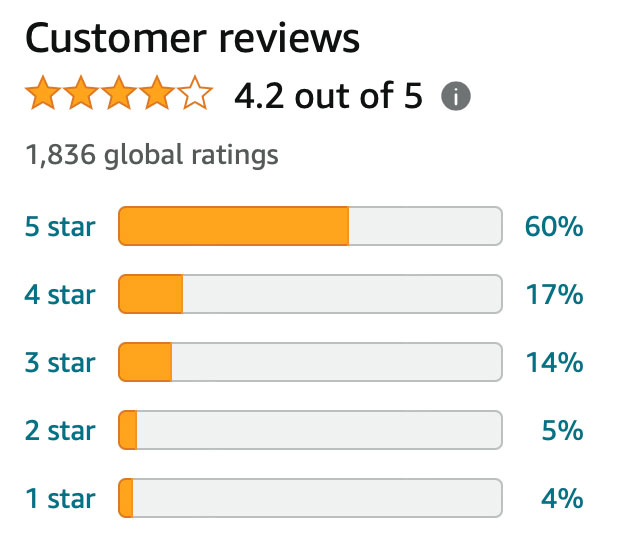
This book has almost 2,000 reviews. Some of these are 1 and 2 star reviews. Look at the bad reviews to see what’s missing.
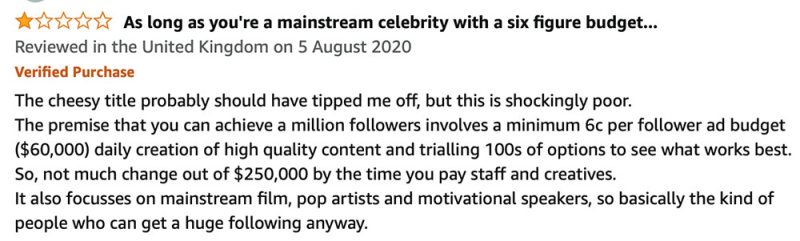
The following reviews are for a popular book on Amazon
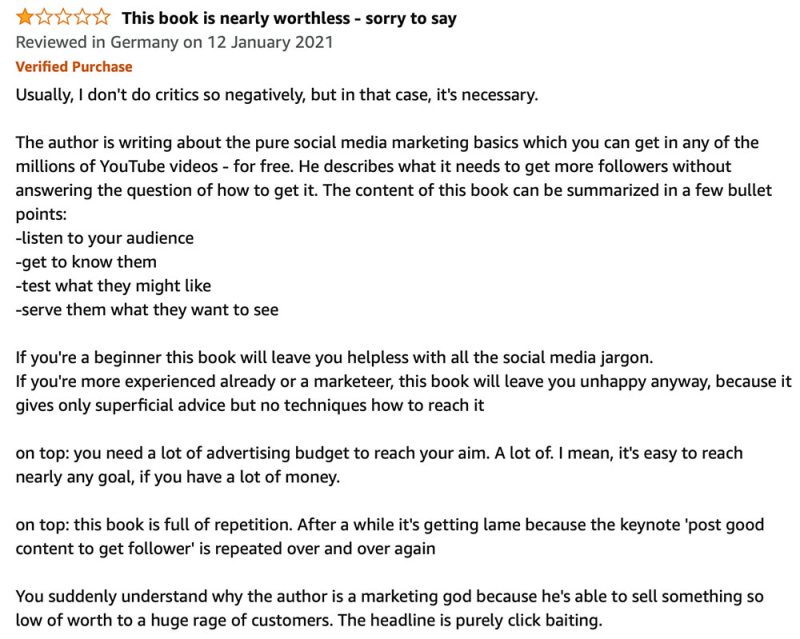
From this review, you can learn that the reader did not find at all what they were looking for. They were clearly expecting tactics which the book didn’t deliver.
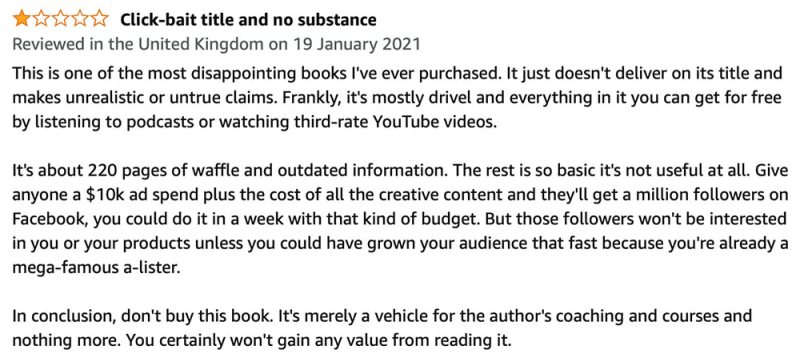
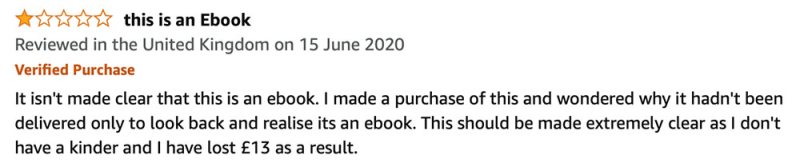
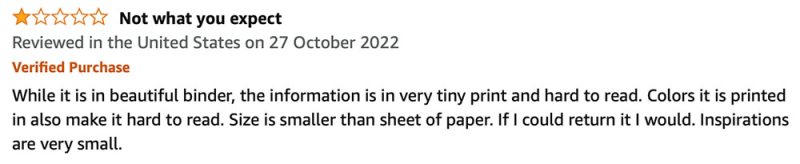
Another example – this time a wedding planner book
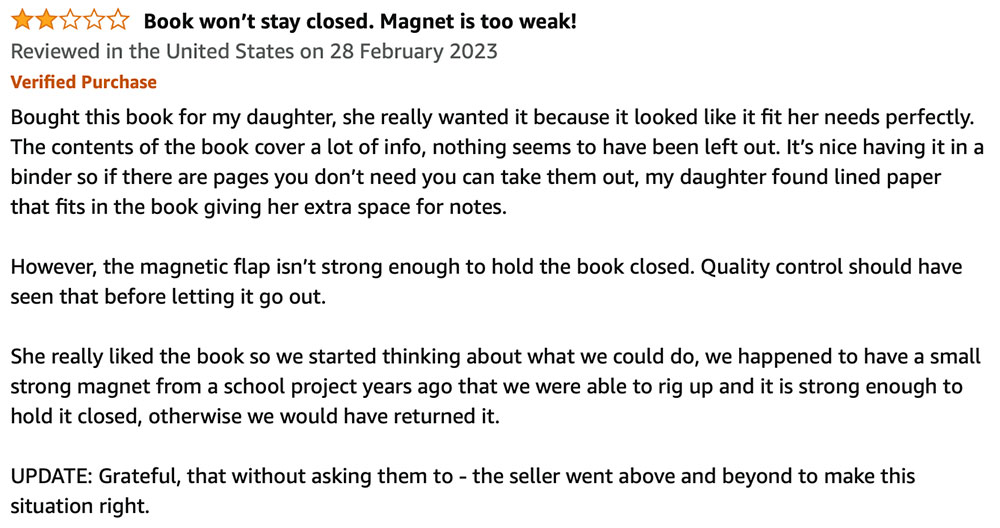
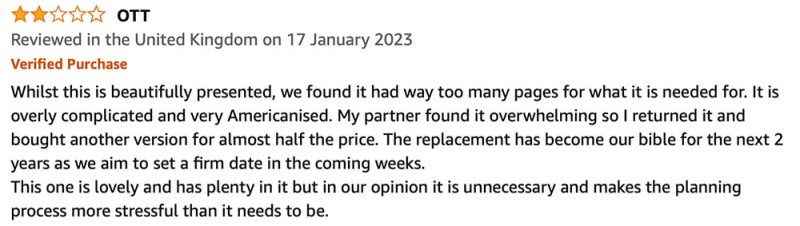
This customer is looking for a simpler way to plan their wedding. An opportunity to create content.
Find customer questions on Facebook
You need to be clear about your target customer. Where do they hang out? Where do they spend time? Who do they chat with? Are they of a specific demographic?
- Open Facebook.
- Look for Facebook Groups where your target customer hangs out.
- Before joining a Facebook group, make sure they have many members (at least several hundred) and have at least a few new posts every day.
- Join or request to join the group.
- Once you’re in, use the Search Field in the group (top right) and enter your product or service type in the search field. For example:
- You’re selling your artwork. Look for “gift ideas”
- If you’re selling bookkeeping services, look for “bookkeeping” or “tools” or “software”
- If you’re selling wedding cakes, look for “cake”.
- You’re an acupuncturist. Look for “stress” or “fertility”.
- Look through the search results and find questions people ask.
- Every question is an opportunity for a blog post.
- Once you’ve written the blog post, you can even post the link below the person’s question!
Find customer questions on Reddit
- Open Reddit
- Enter your product (type) or service (type) into the search.
- Join a subreddit.
- Look for questions.
- You can even use the answers for ideas for your blog post (don’t copy and paste!!).
Find customer questions on Quora
- Open Quora
- Enter your product (type) or service (type) into the search.
- Look for questions.
- You can even use the answers for ideas for your blog post (don’t copy and paste!!).
Here’s a 1-minute video about how to find customer questions on Quora.
Find customer questions on Forums
There are still many forums and communities where people hang out and discuss your product type, industry or service. Join these forums and look through the questions.
If someone asks a question on social media or in an online forum, chances are many other people have the same question.
Here’s a 1-minute video about how to find customer questions on forums.
Platforms and tools for social listening
Naturally, an app, tool or platform can do all that for you (to some extent!). I’ve already mentioned Facebook, but you can also check X discussions (formerly known as Twitter).
Social Listening tools allow you to track every mention of your brand on different social media platforms in real time. They can also track the mention of specific keywords and alert you when a new discussion occurs. You can then learn how your customers feel about your type of product or service, what they find annoying about it and what they want to see improved.
Social Listening is big business, and as soon as you search online for “best social listening tools”, you will find they all come with a hefty monthly price tag. The only free one is Google Alerts. You can set up many alerts and get an email as soon as your keyword is mentioned somewhere.
Here are a few tools that can do social listening for you:
- Hootsuite
- Talkwalker
- Buzzsumo
- Google Alerts (FREE)
What should I do with the customer questions I find online?
Answer them on your website in detail.
- First, collect a list of questions and pain points your customers discuss online.
- Put them into a spreadsheet and collect more over time.
- Categorise the questions by topic or pain point.
- You will soon see specific topics that lend themselves to a blog topic.
- Some questions can be answered in one blog topic, some questions need to be covered in more depth.
Optimise your blog posts so that you have a chance to rank in Google
This is an obvious one! Use good images to support your topic and use a correct headline structure so that your readers and search engines understand the structure of your post. Make sure that every headline is a potential keyphrase people might enter in a search engine and then provide a good answer to this question.
Write a good meta title and meta description so that search engines instantly understand what your blog post is about.
Promote your blog posts so they have every chance to be read and discovered
Once you’ve written the blog post, promote it – everywhere you can! Send it to your mailing list. Send it to your mum! Publish on Facebook, Instagram – anywhere you’re active online!
This is an often overlooked part of blogging. However, if your website is still new, the likelihood of your blog post ranking in search engines quickly is slim. So you need to give your new content a little hand to be discovered by sending it to your contacts and followers.










