
Quick summary
Each blog post should focus on one clear topic and be treated as its own SEO opportunity. Use your main keyword in the title, URL and headings, write a helpful meta description, structure your content with clear sections, and include images with ALT text. Aim for enough detail to fully answer the question, not just a specific word count. If your content is clear, useful and easy to scan, Google can rank it and AI tools are more likely to cite it.
Optimising your blog posts for SEO doesn’t have to be complicated. This guide demystifies the process and shows you how to make your content visible to Google Search, useful to readers, and more likely to support your wider blog SEO strategy.
Google indexes individual web pages, not whole websites!
Search engines like Google store and rank individual URLs. That means each page is an opportunity to appear in search engine results. Your website is simply a collection of pages, and each one can rank (or fail to rank) on its own.
This is why every seo blogpost needs its own focus, title, URL, meta description and content optimisation. You are not just optimising your website once. You are optimising each individual page so Google can understand where it fits in search engine ranking.
Focus each blog post on one topic
Each blog post should cover one topic properly. This helps Google understand what your page is about and makes it easier for readers to get a clear answer. Choose one main keyword or phrase and build the entire post around it.
This is where search intent matters. Search intent simply means the reason someone types something into Google. Are they looking for a quick answer, a how-to guide, a comparison, or a product? Your blog content should match what the person actually wants to find.
Common mistakes beginners make on their blog
- Trying to cover too many topics in one post: Keep each blog post focused on one clear topic so Google and your readers understand what the page is about.
- Forgetting to use the main keyword: Include your keyword naturally in the title, URL, headings and content, but don’t overuse it.
- Writing for Google instead of people: Your post needs to be helpful, clear and easy to read. SEO works best when the content is useful first.
- Skipping the meta description: A good meta description can help people understand why they should click on your post in search results.
- Using vague headings: Clear headings make your post easier to scan and help search engines understand the structure of your content.
- Not adding internal links: Link to other relevant pages or blog posts on your website to help readers explore more and support your SEO.
- Forgetting image ALT text: ALT text helps describe images for accessibility and gives search engines more context.
- Thinking longer always means better: A long post full of waffle won’t help. Focus on answering the question properly and clearly.
Essential elements of an SEO-friendly blog post
SEO is about structure, clarity and usefulness. These are the key elements every seo friendly blog post should include.
1. Title tag (meta title)
- Use a clear, descriptive title that explains exactly what the post is about
- Include your main keyword, ideally near the beginning
- Keep it under about 60 characters so it displays properly in search results
- Make every title unique
In this blog post:
- The headline is this: How to add SEO to a blog post: A beginner-friendly step-by-step guide
- The title is this: How to add SEO to a blog post: A beginner-friendly guide
I removed the “step-by-step” part as the main headline was too long for the title. This is a simple but important SEO tip: your headline can be slightly longer than your SEO title, but your title tag needs to work well in search engine results.
2. URL (slug)
- Keep URLs short and easy to read
- Use real words, not random numbers
- Include your main keyword
- Use hyphens to separate words (not underscores)
In this blog post:
- The full page URL is this: https://business-image.co.uk/add-seo-to-a-blog/
- The actual blog URL is this: /add-seo-to-a-blog/
I removed the “step-by-step” part as the main headline was too long for the title. The final version is a short, simple and seo friendly URL.
3. Meta description
- Write a short summary of what the page is about
- Make it appealing so people want to click
- Keep it around 155–160 characters
- Avoid stuffing it with keywords
In this blog post:
- The meta description is this: Learn how to add SEO to your blog posts: beginner-friendly guide. Simple steps to help you rank higher on Google and get found online.
A good meta description will not magically guarantee SEO success, but it can help people understand why your page is relevant when they see it in search engine results.
4. Headings and structure
- Use one H1 (your main title)
- Break content into sections using H2 and H3 headings
- Include keywords naturally in headings
- Make it easy to scan
In this blog post:
- The main headline you see at the top has the H1 tag.
- Subsequent headlines have the H2 tag.
Clear headings help readers, Google and AI tools understand the structure of your seo content. They can also improve your chances of being pulled into a featured snippet when your content answers a specific question clearly.
5. Content (the main body)
- Answer the main question clearly and early in the post
- Stay focused on the topic
- Use simple language and short paragraphs
- Include examples and explanations
- Add internal links to other relevant pages
- Link to trusted external sources when helpful
In this blog post:
- As you can see, the blog post doesn’t contain my life story or my love of cats. There’s no waffle. It explains the topic clearly in as little, but as many, words as necessary.
Good content writing is not about adding more words for the sake of it. It is about creating relevant content that answers the question properly. This is also where your content strategy and content marketing overlap with SEO. A helpful article can rank in Google, be shared on social media, and support your wider SEO strategy.
Internal linking is also important. An internal link is a link from one page on your website to another page on your website. Internal links help readers find related content and help search engines understand which pages are connected.
External links are links from your website to another website. These can be useful when you are citing trusted sources, research, tools or official documentation.
6. Images and ALT tags
- Add images to support your content
- Always include ALT text that describes the image
- Keep ALT text natural and useful, not stuffed with keywords
- Use descriptive file names
Images can improve the reader experience and support SEO performance, especially when they are relevant, compressed properly and named clearly.
In this blog post:
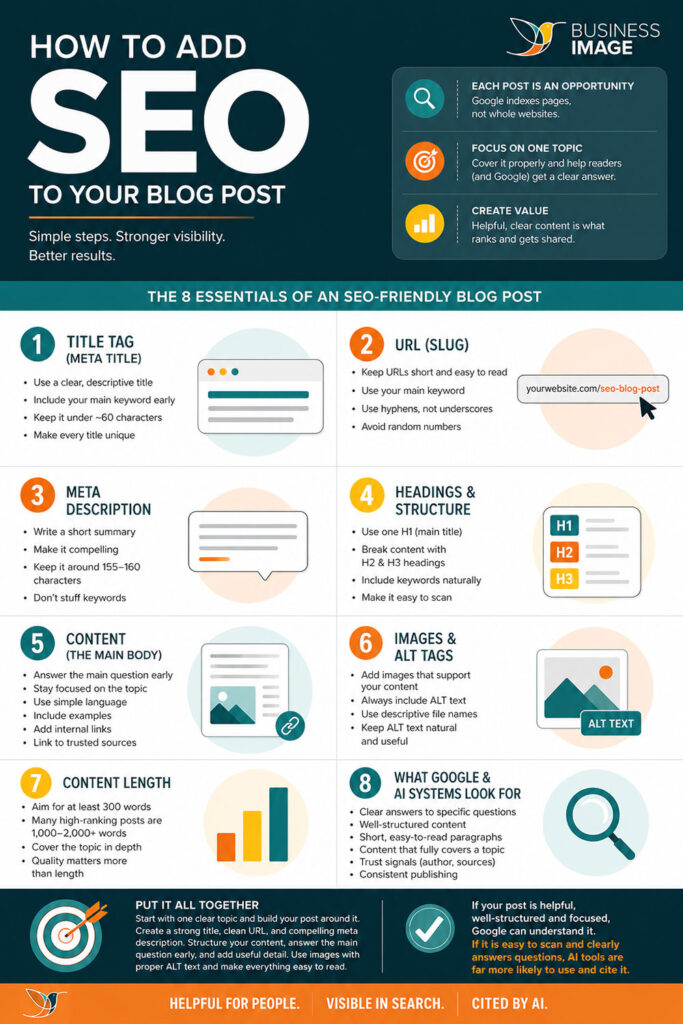
- There’s only one image at the bottom of the post. It’s an infographic people can save to their computer giving them an overview of what to optimise on their blog. The image file name is: how-to-add-SEO-to-a-blog-post.jpg
- The ALT tag is this: how to add SEO to a blog post
7. Word count and content length
There is no perfect length, but your content needs enough detail to properly explain the topic.
- Aim for at least 300 words as a minimum
- Many high-ranking posts are between 1,000 and 2,000+ words
- Longer content often performs better because it covers the topic in more depth
- Quality matters more than length
For this post, the goal is not to write the longest seo blog on the internet. The goal is to make the topic clear for beginners and give enough detail so readers can take action.
This blog post has approximately 2,100 words.
8. What Google and AI systems look for
- Clear answers to specific questions
- Well-structured content with headings
- Short, easy-to-read paragraphs
- Content that fully covers a topic
- Trust signals like author details and sources
- Consistent publishing on the same topic
The Google algorithm is designed to understand helpful, relevant content. AI systems also look for clear answers, good structure and trustworthy information. That means your content should be easy for humans to read and easy for machines to understand.
You can use an SEO tool such as Google Search Console, Google Analytics, Semrush, Ahrefs, Ubersuggest or Yoast to review your SEO performance. These tools can help you see what people search for, which pages get traffic, and where your content could be improved.
Putting it all together on your own blog
Start with one clear topic and build your post around it. Create a strong title with your keyword, write a clean URL, and add a compelling meta description. Structure your content using headings, answer the main question early, and expand with useful detail. Add images with proper ALT text and make sure your content is easy to read.
If your post is helpful, well-structured and focused, Google can understand it. And if it is easy to scan and clearly answers questions, AI tools are far more likely to use and cite it.
For long-term SEO success, think beyond one post. Build a content strategy around related topics, use internal linking to connect those pages, create relevant content consistently, and review your SEO performance regularly. Blog SEO is not about tricking a search engine. It is about making your blog content easier to find, easier to understand and more useful for the people searching for it.
Frequently Asked Questions
What is blog SEO?
Blog SEO is the process of optimising blog content so it has a better chance of appearing in Google Search and other search engine results. It includes keyword research, content writing, headings, meta descriptions, internal linking, external links, image ALT text and content optimisation.
What makes an SEO-friendly blog post?
An SEO-friendly blog post focuses on one clear topic, matches search intent, uses a clear title, has a short SEO-friendly URL, includes helpful headings, answers the main question early and uses internal links where relevant.
What is search intent?
Search intent is the reason someone types a query into a search engine. For example, they may want an answer, a tutorial, a product, a service, or a comparison. Your blog content should match that reason.
How do internal links help SEO?
Internal links connect one page on your website to another. They help readers find more relevant content and help Google understand how your pages relate to each other.
What is an internal link?
An internal link is a link from one page on your website to another page on your website. Internal linking helps guide visitors to related blog content, improves user experience, and helps search engines understand your site structure and which pages are most important.
Should I use external links in a blog post?
Yes, external links can be useful when linking to trusted sources, research, official guidance or helpful tools. They can make your seo content more credible.
What is an external link?
An external link is a link from your website to a different website. External links are useful for referencing trusted sources, adding credibility to your content, and supporting your SEO content by showing Google that you are connecting to relevant, authoritative information.
What is a featured snippet?
A featured snippet is a highlighted answer that appears near the top of some Google search results. Clear headings, direct answers and well-structured content can improve your chances of being selected.
Can Google Analytics help with blog SEO?
Google Analytics can help you understand how people interact with your blog content. It can show traffic, engagement and user behaviour, which helps you improve your seo strategy.
Is technical SEO important for blog posts?
Yes. Technical SEO helps search engines crawl, understand and index your content. It includes things like page speed, mobile usability, secure URLs, indexability and clean site structure.
What is content optimisation?
Content optimisation means improving a page so it is clearer, more useful and more likely to rank. This can include improving headings, adding missing information, updating old content, adding internal links and matching search intent better.
What is content optimisation?
Content optimisation means improving a page so it is clearer, more useful and more likely to rank. This can include improving headings, adding missing information, updating old content, adding internal links and matching search intent better.
How long should a blog post be for SEO?
There is no perfect length. A blog post should be long enough to answer the topic properly. For many posts, that might be 1,000 to 2,000 words, but quality and relevance matter more than word count.
What is link building?
Link building is the process of getting other websites to link to your content. These links can help search engines see your content as more trustworthy, especially when they come from relevant and reputable websites.
Can social media help SEO?
Social media does not directly guarantee search engine ranking, but it can help more people discover your content. More visibility can lead to more shares, links and traffic.
What is an SEO tool?
An SEO tool helps you research keywords, check rankings, find technical SEO issues, review links and monitor SEO performance. Examples include Google Search Console, Google Analytics, Yoast, Semrush, Ahrefs and Ubersuggest.
What is the difference between SEO content and normal blog content?
SEO content is planned around what people search for. It still needs to be helpful and readable, but it is also structured so Google and other search engines can understand it.
How do I know if my SEO blog is working?
Check your SEO performance using tools such as Google Search Console and Google Analytics. Look at impressions, clicks, rankings, traffic, engagement and enquiries from the post.










