
Quick summary
The best blog post format is one that’s easy to skim and genuinely helpful. Start with a clear intro (what the post covers and who it’s for), then use short sections with descriptive headings, simple explanations, and examples. Add internal links, a quick summary, and a clear next step at the end so readers stay longer, take action, and Google understands the topic properly.
Learn about standard blog post elements and what blog post format works best.
What is a blog post and what is not?
A blog is a supporting page on your website that provides solutions to problems or answers to your target customer’s questions.
A blog is not a business diary that lists the different activities you do in your business on a day-to-day or week-to-week basis.
While you can include some activities or portfolio work, 80-90% of your blog post should answer your customers’ questions.
No doubt, you will have answered a lot of questions over and over again. People will also ask these questions in Google, and – with some technical SEO understanding – you will have an excellent chance to come up in the search results.

What is a good layout for a blog post?
There’s no simple answer to this question.
When you write a blog post, think about the person likely to read it.
Your target customer is super important when thinking about your blog post format!
Let’s look at some examples.
Scenario 1: You’re an optician and sell glasses and contact lenses. Your target customer is over 50 years old and needs reading glasses.
Solution:
- A quality blog post format should have larger than standard text so people can scan the information without straining their eyes.
- You should use a clear structure using even larger headlines that clearly stand out.
- Avoid using large text blocks and keep paragraphs to 3-4 lines.
- You can also use bullet points so the reader can quickly scan the text.
- Include clear visuals (images, graphics) that convey a clear message. Avoid using text on photographs as they might be harder to read.
Scenario 2: You’re a bookkeeper, and your target customer is a small business owner in their mid-thirties.
Solution:
- Many (!!) Bookkeepers – by their nature, LOVE numbers and data! Therefore, you could support some facts with relevant statistics.
- Structure the page well using headlines that are easy to read (avoid swirly fonts!) and stand out clearly from the rest of the text.
- Use clear visuals that support your text.
- You can include demos, case studies, and PDF downloads that provide further information.
- You can include calculators or interactive elements that allow your reader to engage with your content.
What are the standard elements of a good blog post?
Different blog post formats or blog layouts contain distinct elements. However, having read and examined many blog posts, you will see a particular blog post structure that keeps repeating itself.
Here are the main elements of a good blog post format:
- A clear title (H1)
- An additional sub-headline below the title (H2)
- A featured image that clearly supports the blog content
- The featured image should be displayed on the blog page and in the header of the blog post.
- The author of the blog post.
- The date when the blog article was written.
- A photo of the author
- The body copy
- A short bio of the author below the blog post
- A call to action
- Clearly visible links to other blog posts or pages within your website
- Clearly visible links to external websites/blogs for supporting information.
- Good quality media, such as images, graphics, videos, audio files, PDF downloads etc.
- A contact form
- Structured Markup
Your main objective is to achieve a blog post format that works well on mobile devices!
When writing this article (Jan 2026), over 60% of web pages are read on a mobile phone (you can check this here).
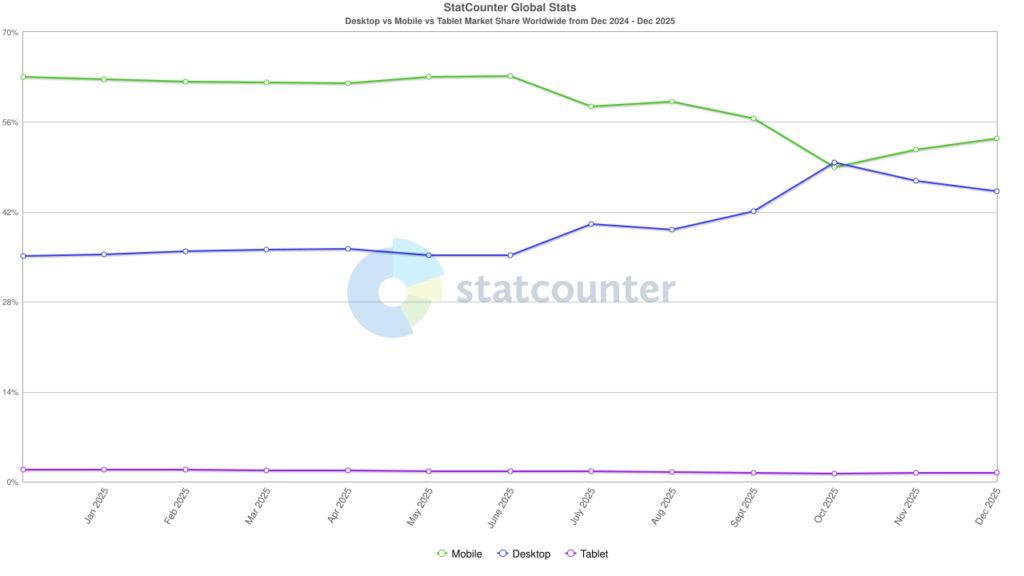
Think about how people use their phones. When you look at the big social media platforms, they all adopt the vertical scrolling method for their feeds. People are used to scrolling vertically and reading websites and blog posts by holding the phone in one hand and scrolling down.
Therefore, avoid squashing content or paragraphs into columns. Use a simple layout that clearly demonstrates structure:
- Headline
- Text
- Bullet Points
- Headline
- Text
- Image
And so on.
Business owners who have built their own website often “overthink” the format they should use on their web pages or blog posts.
Simplicity wins, hands down, any time! A clear display of information without “creative” use of style or graphics is often better than an over-designed blog post layout with moving elements. Avoid slideshows or information accordions (where you have to click to see more details).
Your blog post format should not be different!
This might sound counter-productive! Do you want your website to stand out and look different from your competitors?
Well – no, actually!
People have grown used to reading the information a certain way. If your website is totally different, it provides a tremendous amount of friction as people have to learn and figure out how to use your website. You want to avoid that at any cost!
Let’s talk about the different elements in more detail.

If you want to know more about web usability, here’s a good book for you: Don’t make me think.
A good blog post layout has a clear title (H1)
Each page or blog post should have a clear headline at the top using the H1 format. Incidentally, each blog post must only have ONE Headline 1. Consider this the page’s title, similar to the title of a book chapter.
This headline should not be marketing speak, such as “Elegant solutions for successful business owners”. It should clearly state the following:
- What the content is about
- What the reader will learn
- What question will be answered
- And it should be enticing for people to click on!
For example: What are the elements of a typical blog post?
When you look at blogs from now on, check the headlines people use and which ones you click on.
Marcus Sheridan (the “god” of content marketing) has summarised the best headlines to be the following (this is also what people most search for in Google!):
- Cost and pricing.
- Problems (yours).
- Comparisons and versus.
- Best of lists (best in class, best practices).
- Reviews.
Marcus calls these “The Big 5”. You’ve clicked on the post because the headline contains the word “Best”…
Use sub headlines (H2) to structure your content (not to make it look pretty)
Use your headlines in your blog post to structure the content. Make sure you ONLY use headlines as structure and not for design! Headline 2 can only be followed by another Headline 2 or a Headline 3, like this:
- Headline 2
- Headline 3
- Headline 3
- Headline 3
- Headline 2
- Headline 3
- Headline 4
- Headline 4
- Headline 3
- Headline 3
- Headline 2
- Headline 2
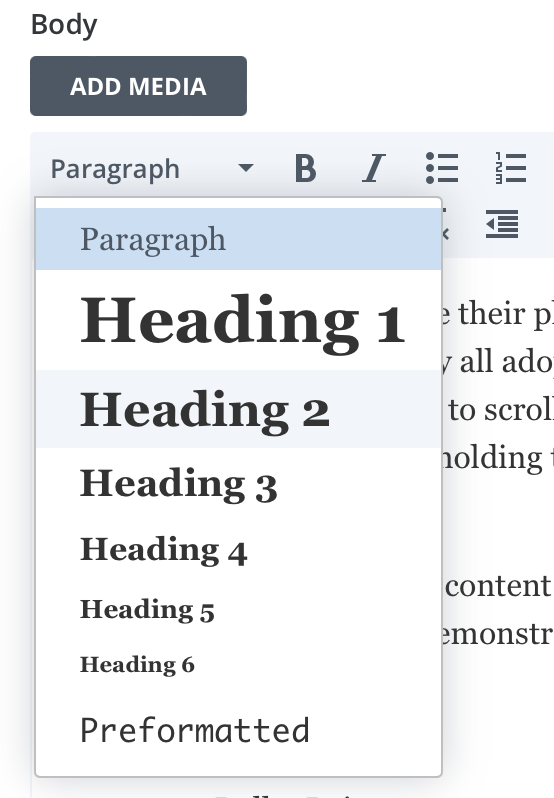
This is important for search engines to understand the structure of your content. Google can easily deduct bullet lists from a well-structured blog post.
A good blog post contains a featured image that supports the blog content or repeats the blog title.
A featured image is the primary image displayed when someone looks at your blog overview page. Social media platforms also use the featured image when you or someone else shares your blog post.
Make sure your featured image is relevant to your blog post. It can include a photograph or a graphic (or a mixture of both), and it can (but doesn’t have to) include a headline.
You should repeat the featured image on the blog post in the header to indicate that the person has clicked on the correct blog post.
Display the author of your blog post (even if it’s you!)
A blog post should include the author above or below your blog content. Suppose Search Engine Optimisation is important to you; putting your name above a blog post can help improve your online authority. Google uses many different ranking signals, and some can be summarised as EAT, which stands for Expertise, Authoritativeness, and Trustworthiness.

Here’s why this is important: Let’s say you worked for a big HR company and were responsible for creating blog posts around many different HR topics. Even after you have left your job, there are still blog posts on the company website where your name is listed as the author of the blog posts.
After a few years, you decide to set up your own business.
Scenario 1: You love HR and start your own HR agency. You know blogging is important, and you keep creating and adding HR-related blog posts to your own HR Agency website.
Google already knows that your name is associated with HR (from your previous employer). Google has now found your name on a different website – again, in the context of HR. Therefore your website’s trustworthiness has increased because you have confirmed (in the eyes of Google) that you’re an HR expert.
Scenario 2: You can’t stand HR. You’re accepting a job from a company that instals solar panels. You know, blogging is essential. You start blogging for the solar panel company, and your name is now associated with solar panels. Google is now confused… Are you an HR expert or a solar panel expert? The trustworthiness of the solar panel website might be reduced because a former HR expert now claims to know everything about solar panels! (This is a very simplified example here!!)
A very similar scenario happened to me. I have created numerous blog posts for my business customers every time they wanted my name on the blog post. While this is flattering, it didn’t help my business. Google saw me as a blogger for cleaning products, radiators, and roadworks, and now I suddenly talk about SEO! The Moz SPAM score of my website was 52%! I removed my name from my client’s websites and used one of their staff members’ names instead. I ensured that wherever my name was mentioned online, I also talked about Local SEO and website design. It took a few months, but my SPAM score is now 1% which is pretty standard.

High Spam Score in Jan 2022

Low Spam Score in Jan 2023
Should you include a photo of the author on your blog?
I’d recommend it. People buy from people, and a photo makes a blog post more personal than a big faceless company post. Only use a small image, and pop it into a circle beside your name. Make sure to use the same photo everywhere in your socials for consistency.
Should your blog post include a date?
It depends on the type of blog post you’re writing! In this ever-changing industry (SEO), it’s best to include a date in your blog post to let people see that you’re active and that the blog post is fresh or has been updated. It can also help the person decide if it’s still relevant.
If your blog post consists of evergreen content, such as recipes, knitting patterns, and general how-to instructions, no date is required!
But if you work in a trend industry or an ever-changing sector, showing a date can increase the reader’s trust that your content is worth reading.
How to structure blog content?
- Use good headlines and ensure each headline tells the reader about the next section in the blog post.
- Avoid vague headlines that – when read on their own – don’t convey any meaning, for example: “Let’s investigate.”
- Use an easy-to-read font.
- Make sure your text is big enough so people can read it without straining their eyes.
- Make sure the contrast between the text and background is good so that people can easily read your text (for example, yellow on white is really hard to read).
- Use bullet points
- Use graphics, images, infographics, and videos.
Should you include a short bio of the author below the blog post?
Most website builders, such as WordPress, allow you to create a standard footer displayed below your blog articles. You can format this bio once and display it below every blog post. If you want to change it, you can customise your website so that you only have to change it once. All blog posts are then updated automatically. Especially when using the Divi Theme, this is super easy to set up.
Include a call to action in your blog post
When writing a blog post, think about “What’s the point” of this post? What do I want people to do? For example:
- Read another blog post
- Download a PDF
- Calculate a service package
- Send an Enquiry
I’d recommend repeating the CTA (Call to Action) several times throughout the blog post in different formats, such as a regular text link and as a button below the blog post.
A example of a Call to Action
Should your blog post include links to other blog posts or pages within your website?
Yes, this is very important for SEO – search engine optimisation. Search Engines such as Google discover other pages and blog posts on your website by reading your website’s sitemap and following internal links. When you write several blog posts around a specific subject, you include links to another blog post on your website. Google will also understand that the other blog post provides more information on this subject.
Make sure that your links are clearly visible and recognisable as a link by using another colour or making it bold and underlined. Always check the links are still readable and colour contrast is correct.
Should your blog post include links to external blog posts or other websites?
You can include links to other websites to support your provided information. Some people want to see the source of information and prefer to look it up, while others want to know that you spent time providing the source. In this blog post, I have added links to Orbit Media, Buzz Sumo and GS Stats.
How many photos should you include in a good blog post?
Buzzsumo states that blog posts are shared more often if they have more images.
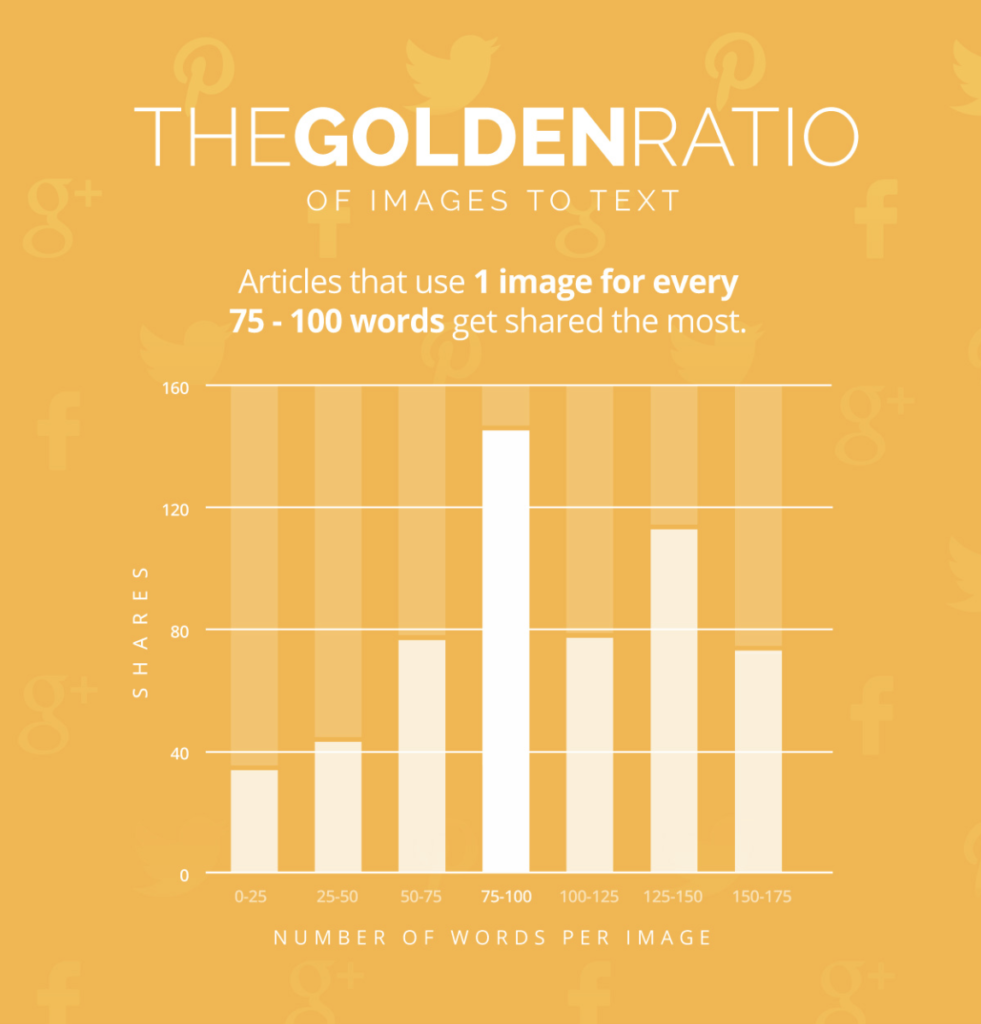
"Articles that use 1 image for every 75-100 words get shared the most"
Buzzsumo
Your article has 1000 words – they suggest 10 images. Your blog post has 2000 words – they suggest 20 images!.
Make sure the images are relevant to your blog subject.
Will the use of video in my blog post increase SEO?
Video embedding indirectly signals to Google that your blog post is worth reading. When people watch a video, they spend more time on your blog post/website. Google then registers a longer “dwell time”, which is used for your website’s “Engagement Rate”. The longer someone is on your website, the better your engagement rate. If the video prolongs this, then it’s a good thing!
Should your blog post contain a contact form?
If your blog post discusses a specific product or service that lends itself to asking the reader to get in touch, then – by all means – include a contact form. You can also have a link to your contact page.
If you want readers to comment or provide more questions, you can create a unique contact form for a particular blog post or all of your blog posts.
How long should a blog post be – 1,500 words!
Chicago-based web design company Orbitmedia do original research every year. One of their recent surveys confirms that a blog post with a good chance of ranking in Google should have 1,500 words.
However, this is a guidance number, and the length depends on your subject, industry and online competition! I have written blog posts with 500 words, and they are still – years after publication – on page 1 in Google. Others have 5000 words and don’t rank.
The length of the content is one thing, but relevance is more important. Try to keep your blog post content manageable so that you have 1,500 words. If there’s no substance in words, it won’t get your blog post ranking higher.
Years ago, I wrote a blog post about the most common wedding cake flavours in the UK. This blog post has 900 words, but consistently is in the top spots on Google (position 1, 2 or 3). The number of words is not always important. As long as you explain the topic satisfactory and with enough relevant information, you have every chance to rank for it.










