Quick summary
Building your own website can work if you’re on a tight budget and happy to spend time learning, but it’s rarely the “quick and cheap” option people expect. DIY sites often end up costing more in the long run through wasted time, messy setup, weak SEO, and a site that doesn’t convert visitors into enquiries. Hiring a web designer costs more upfront, but you get a website that’s structured properly, looks professional, loads faster, and is built to bring in leads: plus you avoid the stress and second-guessing.
Building a website can feel like a daunting investment, especially when you’re running a small business. This article outlines the pros and cons of both DIY website building and hiring a web designer, helping you make an informed choice for your business: Should you build your own website?
You may have run your business mostly on social media until now, or you’re thinking about starting your own business but you may be worried about having to spend too much for a professionally designed website.
As a professional web designer, you may think this article is going to be biassed and that I would encourage you to employ a web designer for a professionally designed website. But that’s not the case. You will find out the pros and cons of both approaches and can make an informed decision.
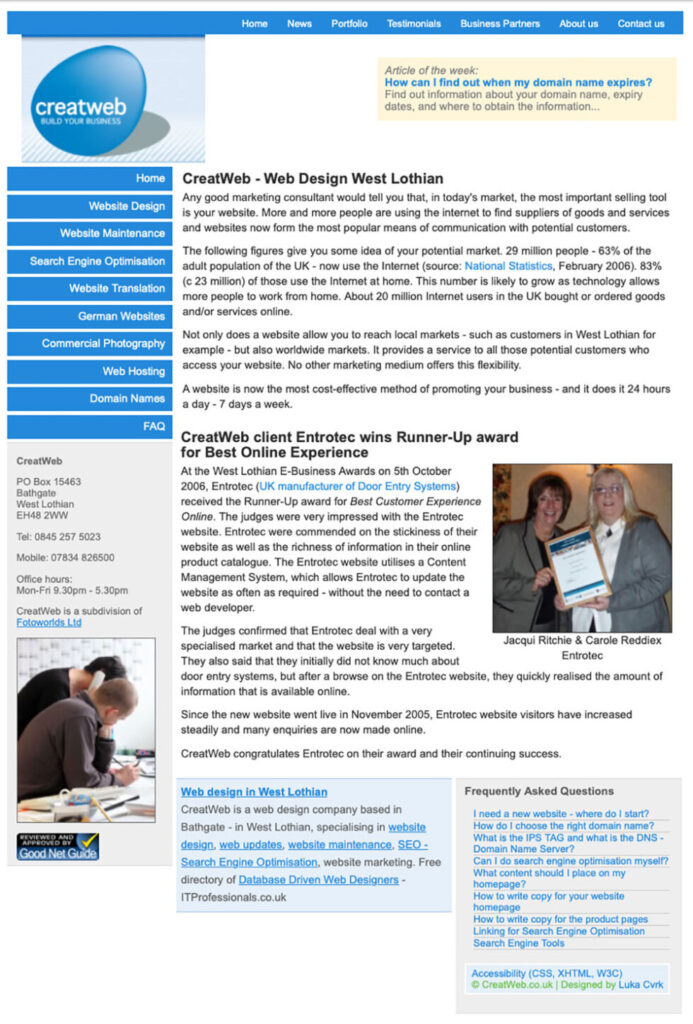
When I started my own business as a web designer, I built my own website – obviously! I am completely self-taught and I have been building websites for well over 20 years. My first website didn’t win any awards, but it helped me attract customers to my business.
This was my first business website in 2005.
There are many industries where small business owners build their own website before they have enough funds to employ a web designer. Especially if you’re a solopreneur – it’s just yourself in your business – you may ask around who can help and you may pick a cheap and inexperienced web designer to build a website for you.
If your business is seasonal, for example you’re a landscaper, wedding cake maker or wedding dress designer, you will be busy working with clients during spring and summer and you will have down time – time for marketing – during the autumn and winter months.
Use your downtime to work on your marketing for the following season.
Building your own website comes with a steep learning curve.
There are different website builders to choose from – all with their pros and cons. Furthermore, you will learn lots of new terminology and you will need to think about how you want to present your business.
Don't be scared to build your own website. With a bit of guidance, you can create a website that attracts customers to your business.
Why is a business website more valuable than relying solely on social media?
First, there’s the trust element. If you’re in business on your own and don’t have a website, people might assume you’re just starting out and that you don’t have much experience. A business website signals that you mean business and took the time and effort to create a professional online presence.
Any content you post on social media is no longer your content. This might come as a surprise, but you don’t own the platform or even your page on the platform. It’s not clear who will see your content. You may have followers or likes, but only a few will see your posts.
If – for any strange reason – you post something even slightly against the community standards or posting guidelines, the platform can disable your account without any warning, and it might take months for you to get it back – if at all! I have seen this many times, and running your business solely on social media is risky.
You should publish your content on your website and then share it on social media. In your social media posts, you invite people to visit your website. By doing that, you’re in complete control of your content and can figure out what resonates with your audience.
The next step is to build an email list. People opt in to hear from you, and you can then send targeted messages to your potential customers. They can decide if they want to keep hearing from you or unsubscribe. You can always use a reputable email service provider like kit.com.
In every email you send, you can invite the recipient to read content on your website, such as a new blog post, or show them a special offer. A website combined with a strong email list can generate much business.
Let’s get into the pros and cons of building your website.
DIY website design: Pros and cons
Advantages of building your own website
- The initial cost is substantially lower: Most website builders offer affordable packages and often including web hosting. (A website builder is a software that’s provided usually for a small monthly fee, such as Wix, GoDaddy.)
- You’re in control: You design your website to your taste and add the content and images you want.
- You have flexibility: Edit your own content, tweak the design and test changes without having to email your web designer.
PS: A word of warning: There are many website builders available. Ensure to choose a site builder that doesn’t have too many web design limitations.
Disadvantages of building your own website
- Be prepared to invest A LOT of time: You need to learn the platform, experiment with design and you will probably spend a lot of time troubleshooting. Quite often you don’t know the terminology and you’re not sure how to solve certain issues.
- There might be technical limitations: Some platforms have a lot of limitations, especially for complex functions. If you want to add things like a shopping cart, you may need to pay extra.
- You don’t have web design experience – you’re not a designer: You may have a good eye for design, but if that’s something you’ve never done, your first website might not look very slick or professional.
Hiring a web designer: Pros and cons
Advantages of hiring an experienced web designer
- You’re getting a customised website design: An experienced web designer will create a website that aligns with your brand and target audience.
- You’re saving a huge amount of time: You can focus on other areas of your business while the designer creates your online presence for you.
- They will have technical expertise: An experienced web designer will have advanced knowledge, prioritise good website content, website speed, local SEO (search engine optimisation), and user experience.
Disadvantages of hiring a web designer
- It’s going to cost you: A professionally developed website is likely expensive. The fees will vary based on your website’s complexity, for example, if you only want a simple brochure website, it’s cheaper, but an online shop is going to cost you way more.
- You’re not 100% in control of your content and layout: If you want a quick update, you might need to email your designer and it might take them days or weeks to implement your changes.
- You may not find the right person/agency straight away: There are so many web designers in the UK, but finding one that’s reliable and affordable who understands your business vision can be challenging.
Cost Comparison: DIY vs. Web Designer
I have written quite a comprehensive blog post where I compare the annual costs of different website builders. You can read that here. Of all the ones I compared (Squarespace, Wix, Shopify, WordPress), WordPress is by far the cheapest and most versatile in the long run.
If you’re looking to set up your own WordPress website, please read this article first as most beginners would head to the WordPress website and start there – which is completely the wrong path.
What does a website cost per year?
Regardless of building your own website or having it built for you, every website has associated costs.
Can you get a free website?
You can get a completely free website. However, this will likely include ads you have no control over. Your domain name will be a subdomain, i.e. look like this: connysmith.wix.com – not professional!
Standard website costs
Domain name costs
You can register a domain name for one or several years. A domain name needs to be renewed regularly. Different types of domain names have different costs. A simple .co.uk domain costs as little as £5 per year. A .com is approx. £12 per year, but if you’re using something like .scot, .online, etc., this might be as much as £100 or even more per year. You can check the domain name prices on websites like 123-reg.co.uk or 20i.com.
Web hosting costs
There are annual hosting costs regardless of which website platform you’ll use for your website. Your website content (the text and images) is stored on a server somewhere, and you need to pay to “rent” a bit of space on that server.
You can get web hosting for as little as £2 per month.
The general rule of thumb for web hosting is that the cheaper the monthly cost, the worse the hosting.
I have written an article on how to find a good web hosting company here.
There are different hosting types available and all come with a different price tag. Shared hosting is the cheapest, however, your website can be slow. This can make website development a frustrating experience and your website visitor won’t enjoy their experience either.
If you’re planning to build a WordPress website with self hosted WordPress, I’d recommend WordPress hosting or managed WordPress hosting.
SSL costs
Every website needs an SSL certificate. Without getting too geeky here, the SSL provides the little padlock in your website’s address bar. Without it, your website is not considered secure and some browsers might even display a warning message before even opening your website.
If you registered your domain name with the same company that provides the web hosting, you can use a free SSL certificate.
Alternatively, you can change the name servers to point to your hosting company, then you can use a free SSL certificate, too. However, before you change name servers, ensure that you don’t have email addresses set up and in use where you bought your domain name, as they will stop working when you change name servers.
If you have an email address already set up and your hosting is elsewhere, you may need to buy an SSL certificate. It sounds geeky, but most reputable hosting providers have a slick process for adding this to your website. You buy the SSL certificate (usually approx. £50 per year for the standard ones that are OK for small business websites), and they will install it for you. It usually takes about one hour from purchase to SSL installation.
Additional website costs
Depending on your hosting provider or website platform, there may be additional costs. For WordPress, there are many plugins that allow you to extend the standard website functionality. Some plugins are free, some come with a one-off or annual subscription fee.
Support costs
If you have your website developed by a web designer, chances are they will offer web hosting. It’s very unlikely though that they offer web hosting for as little as £2 a month. Reputable web designers are keen for their websites to run fast and smoothly, they use business servers and run regular backups. They also use a hosting provider which guarantees a high up-time (i.e. your website will be visible all the time) and has exceptional support.
This is likely to cost substantially more as it includes their support time too. Any website we develop is hosted on our servers. That way we can react much quicker if something goes wrong and fix things before the customer is even aware of it.
If we had to use an external hosting provider, we’d need to speak to yet another person to get access.
What should I know about long-term website maintenance?
- Keep your website content fresh and up-to-date.
- Ensure your SSL certificate is in place and working.
- Ensure your GPDR policies are in place and up-to-date.
- Ensure your plugins are regularly updated and you create regular website backups.
If you build your own website, you’d look after these things. If you host your website with us, for example, you’d look after the content, and we look after the geeky bits.
What is the best website builder?
There are many website builders available, some are free, some come with a monthly licence fee. I have worked with several online website builders and some are VERY limited and clunky to use. The best one I can recommend is WordPress. Regardless of what you read online – WordPress is not more difficult than other site builders. As a professional website designer, I have used WordPress and Webflow and some others in the past.
What is a DIY website builder?
A DIY website builder is a tool or software that allows you to create your own personal website without hiring a web developer. To use a web builder, you need to have basic computer skills, but you won’t need (m)any technical skills or coding knowledge.
Most website builders come with pre-made website templates. These are ready-made website designs you can customise and add your content and images. For example, you can pick a website template for an about page or a blog page on your website. Most website builders are affordable, however, they also come with limitations.
Most builders come with their own content management system (CMS). A content management system is a user-friendly software that allows you to create, manage, and publish content on your website without needing any coding skills. You can easily write articles, upload images, and organise everything in one place, making it simple to update your website. Furthermore, with a CMS, multiple people can collaborate, and you can publish your content with just a click, making it accessible for anyone to build and maintain a website.
Here’s a list of the most popular website builders currently available:
- WordPress
- Wix
- Squarespace
- Shopify
- Webflow
- GoDaddy
- Weebly
How much does the design of a website cost?
When you build your own custom website, you only have to pay for domain, hosting, (SSL), plugins etc.
A professionally designed website can cost anything from £1,500 for a super basic website.
You may find web designers that offer you a website package for £500, or even for free so they can get experience. Or they build a website for you and you then have to pay a monthly fee, such as £100 per month, to keep the website running.
Building a website does take time and you’re paying for the experience, expertise and time of a web designer to build your website.
A small brochure website will be substantially cheaper than an online store.
What are the different types of websites
These are popular among small businesses and creatives such as photographers, designers, and writers. The website showcases work samples and recent projects. You’d focus on visuals and provide a way to attract new clients to your business. Small businesses often use brochure websites. They often have different pages for the different services or products they offer.
Often used by individuals to share their personal stories, thoughts, expertise, or hobbies. You can see my “simple website” here: Nadin Thomson
These are used by larger companies and organisations and provide a lot of detail about their services, products, and contact details. They’re often geared toward building brand credibility and generating leads. The website is much more substantial, showing company structure, the way they work, health and safety information, insurance details, a large blog section and so on.
E-commerce websites are online stores that allow you to sell your products directly to consumers. Features like shopping carts, product pages, and payment options are essential for these websites.
These are created by schools, universities, and online learning platforms, and provide courses, resources, and information to help people learn. They often use learning management systems (LMS) for interactive courses and user progress tracking.
- LMS example: Kajabi, Thinkific, Podia
Charities and non-profits use their website to promote the mission, goals, and activities, making it easy for users to learn about causes and donate.
Sites like streaming services, news portals, and digital magazines fall under this category. They are usually content-rich and designed to engage users with videos, articles, and interactive media.
- Examples: BBC News, Netflix
Membership websites, such as forums or social networks, allow people to join and interact around shared interests. These sites can offer exclusive content that is accessible only to members.
- Examples: Patreon, Substack
Landing page websites are typically standalone pages created for a specific marketing campaign or product launch. They’re designed to capture leads or promote a single call to action (CTA), like signing up for a newsletter or purchasing a product. Sometimes, these are used by micro business owners to get started. You’d show your business name, a few details about what you do, address and contact details and possibly a contact form.
These websites provide people with information about government services, programs, and resources. They usually include details on how to access services and may offer online portals for various applications.
Web applications are interactive websites like project management tools, email clients, or online editing platforms. They function similarly to software applications but run entirely online.
- Examples: Xero, Clickup, Quickbooks, Monday.com, Dubsado
How can I reduce the cost to have a website built professionally?
Building a website consists of several elements: design, structure, content, SEO.
An experienced web designer should be able to help you with all of these, however, the content element is the one part you can help your designer. If you’re providing them with the content to add to your website, they don’t have to employ a copy writer or create the content themselves.
However, bear in mind, writing good content is a skill in itself. Even with AI at your fingertips nowadays, creating engaging website content requires skill.
What is the best decision for you? Build your own website or have it built?
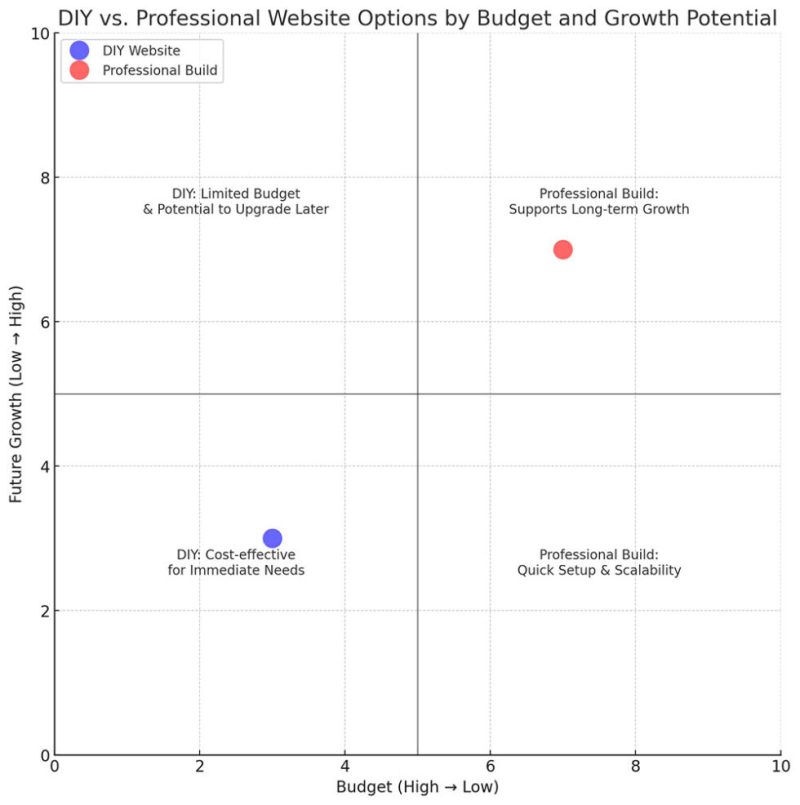
- Budget: If funds are limited, a DIY approach might suit your needs initially, with plans to upgrade later.
- Time: If you only have limited time to learn and build, hiring a web designer might be more practical.
- Technical knowledge: How comfortable are you learning new things and overcoming tech challenges?
- Future growth: If you plan to scale your business quickly, a professional build may support longer-term business growth.