
Updated January 2026
Quick summary
To get started with WordPress, choose a good host, install WordPress, pick a theme that fits your brand, add essential plugins for SEO and performance, set up key pages (home, services, about, contact), and customise your navigation and basic settings. Keep it simple at first so you can launch quickly and improve over time.
Who should use a website builder other than WordPress?
A website builder can be a good choice if you want something quick, simple, and low-maintenance.
You may want to use a website builder if:
- You need a website live quickly and don’t want a learning curve
- Your website is mainly a basic online presence rather than a core business tool
- You’re testing an idea or not yet sure how long the business will run
- You prefer an all-in-one platform that handles hosting, updates, and security for you
- You’re happy working within set templates and limited customisation
- You only need straightforward features such as pages, a blog, or a simple shop
- You’re comfortable paying a monthly fee that may increase as you add features
Website builders like Wix, Squarespace, Shopify, and Webflow are widely used in 2026 and can work very well for many small businesses, especially in the early stages.
Who should use WordPress?
WordPress is a strong option if you want flexibility, control, and room to grow.
If most of the following points above sound like you, WordPress is usually worth the learning curve.
- Your website plays an important role in attracting customers
- Search visibility and long-term SEO matter to your business
- You want full control over design, content, and functionality
- You plan to add features over time, such as bookings, memberships, courses, or ecommerce
- You prefer not to be locked into one platform’s pricing or limitations
- You want your website to grow alongside your business rather than rebuild later
WordPress is used by solo business owners, growing companies, and large organisations alike. Well-known brands and publishers use WordPress because it scales and adapts to different needs.
You can also check and compare on Google trends what the most searched for website creation software is.
There is no “right” or “wrong” platform. The best choice depends on your business stage, goals, and how involved you want to be with your website.
Some businesses start with a website builder and move to WordPress later. Others stay with a builder long-term and thrive. The most important thing is choosing a platform that supports your business now and doesn’t hold you back as it grows.
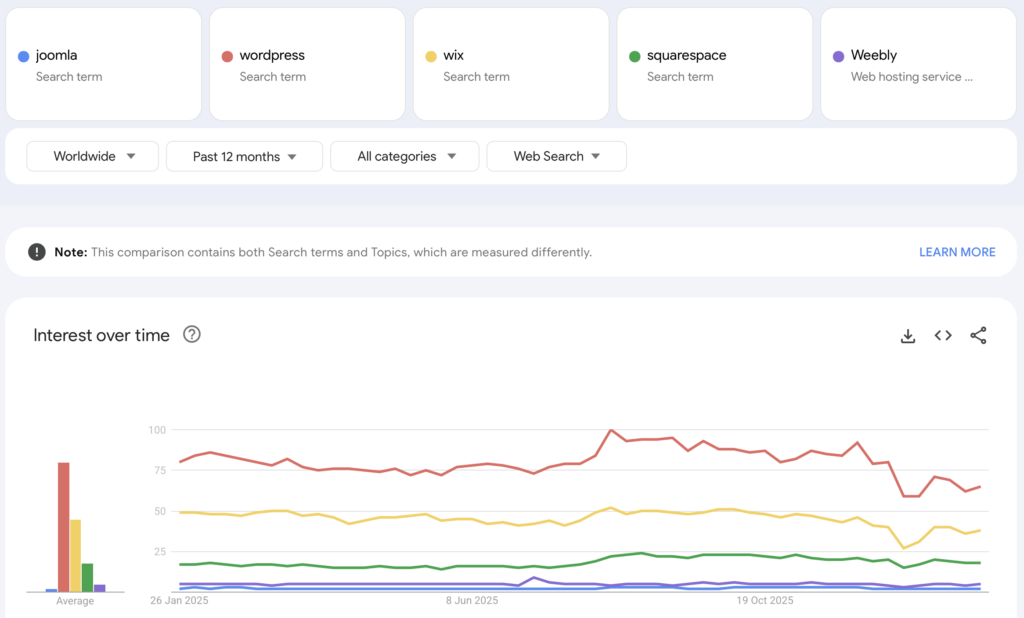
Consider investing the time in WordPress if:
- You need your website to attract customers to your business
- You want long-term SEO flexibility and control, especially if your website content will grow over time.
- Maybe not now, but in the near future you need additional functionality, such as an online shop, a calendar, landing pages, contact forms, membership etc.
- You want your website to reflect you and your business and truly make it yours
- You want everything available at your fingertips and not continually being charged for additional things
WordPress myth buster
Almost every week I read questions and comments on Facebook and these are the things people say about WordPress:
- It’s too difficult
- It’s too techie
- It’s hard to learn
- You have to do update plugins all the time
- You have to pay for themes
- Self-hosting is more expensive
WordPress is too difficult
Like anything new, it can be totally scary to learn something that’s entirely out of your comfort zone.
There are two things you can do: Learn it, or outsource it. Either way it’s an investment of time or money. If you don’t have the funds to pay a good web designer, you can get started with your own website and learn the basics. Your website will evolve over time and WordPress simply grows with you – there are no limits to your imagination.
There are lots and lots of videos about anything relating to WordPress online. Make Google your friend and ask your questions!
You have to update plugins all the time
This is no longer the case. As of a most recent version of WordPress (introduced in 2020), plugin and theme updates can be enabled to be done automatically.
Self-hosting is too expensive
Until I started writing this blog, I couldn’t really say if this was true or not.
I researched the costs and did a price comparison of website builders and self-hosted WordPress. I was totally surprised by the outcome. And as you can guess – as this is a headline under “myths”:
WordPress is cheaper in the long run!
You have to pay for themes
You don’t have to, but I would recommend it.
Once installed, within WordPress you have thousands of themes at your fingertips. And they are all free. With a bit of trial and error, you can probably adapt a free theme to your business.
However, I would recommend a professional WordPress theme.
Regardless of the website platform – make time for your new website!
Without ANY website builder knowledge, you cannot and you should not build a business website yourself in a weekend.
Do not expect to spend a couple of days and then have a fully functioning website for your business. Some platforms make website building look instant, but any business website still takes time to plan, write, and set up properly.
What you have to bear in mind with WordPress is that you will need to spend a bit of time getting to know it and understanding it.
It can feel clunky, or it might be really hard to get your head around things. But if you spend the time experimenting with WordPress for a while BEFORE setting up your website properly, you will be rewarded hugely in the future!
A new website will take a lot of your time – regardless if you use a website builder or WordPress!!
You can absolutely build a website yourself – in WordPress, but it will take time.
Have you already bought your domain name?
Read this guide to understand what you need for your WordPress website and the things you need to keep in mind when ordering your web hosting.
You have no domain name – follow this guide
This easy-to-follow guide will help you understand all the things you need for your WordPress website. It will also highlight aspects you might not know.
WordPress.com is not the same as self-hosted WordPress.
Self-hosted WordPress is usually the better choice if you want full control over your website, plugins, custom functionality, and long-term flexibility.
A note about WordPress.com
WordPress.com is not the same as self-hosted WordPress. WordPress.com is a hosted platform that looks after hosting, updates, and security for you, while self-hosted WordPress gives you more control and flexibility but requires more responsibility or support.
WordPress.com can be a good option if you want the WordPress experience without dealing with hosting setup. Self-hosted WordPress is usually the better choice if you want full control over your website, plugins, custom functionality, and long-term flexibility.
The best option depends on how hands-on you want to be and how much control you need as your website grows.
The things you need to set up your WordPress website
Let me talk you through the elements you need for a website:
- domain name
- (WordPress) Web hosting
- WordPress theme
Without any of these, you cannot get started.
Many people buy a domain name months or sometimes years before they start work on their website. If that’s the case, there’s an additional step for you to link your domain name with your web hosting. It is quite common to have your domain name registered with a registrar such as www.123-reg.co.uk and have your hosting with a different company, such as 20i.com.
In some countries, however, web hosting companies do not allow you to have your domain name elsewhere. In this case, you may need to move your domain name to the hosting company. In general, this is straightforward, but can take anything between 24 hours and 7-10 working days!
If possible, buy your domain name and hosting at the same time
The easiest way for a newcomer is to buy a domain and web hosting with the same company at the same time.
Find a reputable web hosting company in your own country (same time zone, same language) that also allows you to register a domain name.
How to order web hosting & domain name at the same time
Once you have decided on a hosting company, simply click the Buy Now or Order button and start ordering your preferred web hosting package.
Usually, in the second step during the ordering process, the hosting company will ask you if you already have a domain name. Make sure you know what domain name you want to use.
A word of advice about domain names: you only need one!!!
Don’t start ordering all sorts of domain names!! Also, domain names with keywords in it, such as wedding-florist-edinburgh.co.uk do not perform better in Google than one of a florist called “laurasmith.co.uk”.
Stick to your own company or personal name and register the most obvious one.
If you’re in the US, use a .com, in the UK – use a .co.uk, in Germany use .de! You do not need lots of variations as you will only ever use one domain name on your business card or for your marketing (and avoid fancy domain name endings).
Decide on your preferred domain name before you are ready to buy it
It can happen that the domain name of your dreams is already taken.
Sometimes, a website exists, and sometimes someone bought it and is not using it. Either way it will be hard to obtain a domain name that’s already registered. Write down a few ideas and now check if your domain name is available.
Most hosting companies allow you to search for domain names for free.
Simply enter your preferred domain name without any ending into the domain search field. You can do a search on this website for example: www.123-reg.co.uk. For example if you want to use “laurasmith.co.uk” you would enter only “laurasmith” into the search field. The website will then show you all available options.
Check different domain names and their readability.
As domains are registered through a central body, but the hosting companies work like an agent, they can check if your domain name is available. As your hosting company won’t be 123-reg.co.uk, you can still check on this website if your domain name is available and then register it through your preferred hosting company.
Please check your preferred domain name and see if it could be misread!
I have seen some howlers over the years! But check out this blog on Bored Panda to see what I mean about unintentionally inappropriate domain names. For example “itscrap.co.uk” – is meant to be IT Scrap, not it’s crap! Or penisland.net (for Pen Island).
Let me show you four examples on UK, US, German and Dutch hosting company websites so you can get a feel for what to look for.
A note about hosting location and performance
In the past, the physical location of your web server played a bigger role in website performance and SEO. In 2026, this matters far less than it used to.
Modern hosting companies use content delivery networks (CDNs) and global infrastructure, which means your website can load quickly for visitors regardless of where the server is physically located.
What matters more today is choosing a reliable hosting provider with good performance, security, backups, and support. Clear communication, helpful support, and a stable hosting environment will have a much bigger impact on your website’s success than server location alone.
A note about email addresses and email setup
Using an email address linked to your domain name, such as hello@yourbusiness.co.uk, is still important for professionalism and trust. Most reputable hosting providers include basic email accounts as part of their packages.
In 2026, many businesses choose managed email services such as Microsoft 365 or Google Workspace because they offer better security, spam protection, and reliability. These are often worth using from the start rather than seeing them as an upgrade later.
Email forwarders can still be useful for temporary campaigns or sign-ups, but most small businesses do not need to overcomplicate their email setup. The key is choosing an email solution that is secure, reliable, and easy to manage alongside your website.
1. Simple (POP3 or IMAP) email addresses should not cost anything.
They normally have a minimum of 2 GB inbox space. Some hosting companies offer as much as 10 GB, but others may charge for an increased mailbox. Look for a company that gives you at least one 2GB inbox free of charge with your hosting account.
Most reputable hosting companies include 10 or even unlimited email addresses and forwarders.
2. Also check you can set up email forwarders.
A forwarder email looks exactly like an email address, but you may want to use this only for a certain time and then delete it again.You would use a forwarder email address for a marketing campaign. You could set up something like “winflowers@laurasmith.co.uk” – and then all emails that are sent to this email address are forwarded to your main email address or even an external one, such as gmail.
They are not collected in a separate (2GB) inbox, but a forwarder is simply a redirection from one email account to another.
Why do you need forwarder email addresses?
For business reasons, it’s a good idea to be able to measure responses to a marketing campaign. If all responses go into your main inbox, then you will have a hard time counting them. But if they all go to a specific email address, you can simply run a report in your mail program and count how many people have replied to this email. You can then figure out if your marketing campaign was successful or not.
You can also use forwarders for newsletter signups.
I don’t want to give my business email away when signing up for a newsletter. So I set something up like “hello22@mydomain.co.uk” and when I start to get spammed, I simply delete the forwarder and set up a new one. Anything then sent to hello22@ will no longer bother me.
If you’re still unsure whether WordPress or website builder is right for you?
As you can see, there are a lot of things to think about BEFORE you sit down playing with designs.
Website builders simplify a lot upfront, but costs can rise as you add features, and you may have less control over performance, SEO settings, and how your website evolves long term.
How to set up web hosting for WordPress
Simply follow the steps on the web hosting website and enter the required information as you go along. When you search for your domain name, make sure you tick the right one from the list of options that’s displayed. Then they might ask you for additional options, but the standard things are a great start.
Don’t get pushed into buying additional features at this point. Should you need them, you could easily add them later on.
Once you have bought your domain name and you have paid for your web hosting, you will receive an email with the login details. Make sure you keep these details safe. Normally you would access your hosting account via the web hosting company website.
Now you’re ready to install WordPress.
First, you log in to your hosting account. This might be scary, as the hosting account can contain a lot of things that make no sense to you to start with. Each hosting company has their own way of displaying things. When you log in, initially you will see things like your profile, your billing details etc. Look for “my package” or “hosting details” or something like that. If you cannot find it, look for the help section on the hosting company website and enter “install wordpress” – they will normally have an article or a video that talks you through.
Once you see a number of icons, such as email, log files, one-click installs, then look for the WordPress Install.
All you need to do is click on the WordPress icon and then follow the steps on the screen. Everything you enter here (apart from your username!!) you can change in the future. You will need to add your website title, a strap-line, your username and a password.
Make sure you don’t use the word “admin” as your username, but use a complicated username that includes numbers and letters as well as the @ symbol.
This makes it harder for hackers to guess in the future. Make sure you take a note of your username and password as you will need to log in with these.
A note about website security and maintenance
Website security is more than choosing a strong username and password. In 2026, good security is usually handled through a combination of reliable hosting, automatic updates, and basic best practices.
Many modern WordPress hosting providers now manage core updates, backups, and security monitoring for you, which removes much of the fear around maintenance. This makes WordPress far less technical than it used to be for beginners.
At a minimum, your website should have automatic updates enabled, regular backups in place, and basic protection such as strong passwords and two-factor authentication. Security does not need to be complicated, but it does need to be taken seriously to keep your website running smoothly.
Continuing with the installation…
Once you have entered all those things (ignore the checkbox about search engines), click Install and then WordPress is installed within a matter of minutes.
After the successful installation, you will see a login link and you can log in straight away. At this point you can start working on your website.
Next step – install a WordPress theme
As soon as WordPress is installed, WordPress will automatically install a few standard WordPress themes. These are OK, but you cannot really do much with them from a design point of view.
If you’re building a website for your business, I’d recommend buying a professional theme.
I have worked with WordPress since 2005 and have tried all sorts of themes – free and paid. The free ones are usually very limited.
A note about WordPress themes and page builders
There is no single “best” WordPress theme or page builder for every website. Tools like Elementor, Divi, Astra, block-based themes, and other builders all have their place depending on your needs, budget, and technical confidence.
Page builders can make it easier to design pages visually without coding, which is helpful for beginners. However, some setups can add complexity or affect performance if not used carefully.
In 2026, many websites use a mix of lightweight themes, the WordPress block editor, or a page builder where it genuinely adds value. The right choice is the one that gives you enough flexibility without making your website harder to manage or slower to load.










