
Quick summary
Key features every business website needs
Build your site for customers: clear navigation, customer-focused wording, key services with their own pages, strong headline and CTAs. Add useful content and a blog that answers real customer questions, including price guidance. Keep it fast, mobile-friendly, secure (SSL), and use relevant photos plus real people. Use short, readable URLs and sprinkle testimonials where they support claims – don’t hide them on a separate page..
1. Your website is not about you
- Don’t use your website as a catalog of the greatest hits of your business. Your website is not about you, but what you can do for your customers.
- If you start writing a sentence beginning with I, we, our – think about how you can replace this with “you” or “your”.
- When you’ve finished writing content, you should have a ratio of 1:5 for the use of I, we, our to you, your. I.e. you use the word “you” 5 times as often as you use the words I, we, our.

2. Don’t be sparse with words
- If you want your website to rank in Google, you need to write content.
- Even if you love simplicity – Google won’t!
- If you want your website to rank for a certain keyword, you need to have a page on your website that talks about this keyword in depth! Just mentioning one thing and hoping to be on page 1 in Google is not going to work.

3. Your website’s navigation should be clear
- Your navigation must be visible on all content pages on your website.
- Make sure your navigation labels are clear and do not make up words for sections of your website just to be different. Call a Blog a blog. Label the link to your About page “About”. Label the link to your contact page “Contact”.
- If you offer equal to or less than 5 main products and services, list them in your main navigation.
- Don’t use a “Services” link unless you offer lots of services.
- If you offer Kitchens and Bathrooms, include 2 links in the navigation that say so.
- Only use drop downs if they include 5 items or fewer. If you need to show more drop down links, use a mega menu.
- Never include social media icons in the header – you’ve worked so hard getting people to your website and now you’re inviting them to go to Facebook or Instagram and before you know it you’ve lost them to cat videos!
- Remove the link to the testimonials page from your navigation. No-one cares and no-one will read it.
4. How big should the logo be on my website?
- Your logo is NOT as important as you may think. Check the BBC, National Geographic, Coca Cola websites. Their logo is tiny.
- A logo is about you, if you “shout” to your customer by including a huge logo, it’s wasting space you could be using better.
5. Your homepage header image
- Check how other websites in your industry display the header image. There will be an industry “consensus”. This means there is an unagreed standard across many of your industry websites which will be adhered to. If most of them use a photo with one line of text and one call to action, use the same thing. If most of them use a split header image with an image on the right and text on the left – use the same thing!
- Try not to be different.
- Avoid using slideshows. A slideshow hides 80% of the content from the minute you put it on your website. People DO NOT sit back and watch a slideshow.
- Do not obscure the main image with words – check if the text is still easy to read or if people have to strain in order to make out the words.
- Use Headline 1 on or below your header.
- Make sure your most important search term is used in the H1 Headline on your website. If you are a kitchen installer in Edinburgh, make sure that’s your H1 Headline on your website.
- Never use the word “Welcome”.
- Never use the main headline as a strapline. If you take the strapline away from everything else and read it to a 10 year old – would they immediately understand exactly what you do?
6. Homepage Service Sections
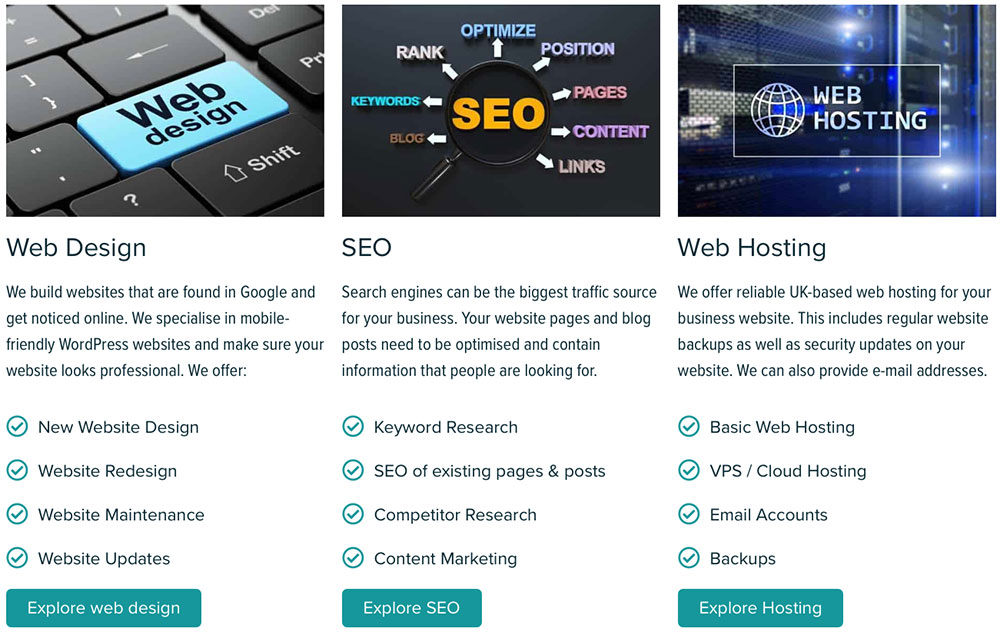
- Include a small number of your main services on your website. Put them in columns and give them a big headline so it’s clear what you offer.
- If you offer Mortgage Advice, Financial Advice and Pension Advice – that’s your three services.
- Link your services to the respective pages. Include a clearly labelled button for each service.
- Never ever have your website just as one long scrolling page. Always have sub pages for each service.
- Check below how we have laid it out on the Business Image Website.
7. Include a clear call to action
- What do you want people to do on each page of your website?
- Don’t come on too strong and ask them to Buy Now or Book Now (this is the equivalent to “Will you marry me” on the first date!).
- Some places lend themselves to a soft call to action, such as “Explore products”, “Get a quote”, “Check Availability”, other pages can have a stronger call to action, such as “Download the report”, or “Request a free trial”.

8. Label your buttons
- Always label your buttons so that the user immediately knows what’s going to happen.
- If you want them to book an event, but the booking form is on a different website, such as EventBrite, tell them on the button label, e.g. “Book your seat at EventBrite”.
- If you want them to download something, tell them on the button what they will download, e.g. “Download the report (PDF)”.

9. What to add to your website footer
People expect to see certain things in the website footer:
- Include a contact section including your business address, company registration number (if available), and a telephone number.
- Include GDPR policies and links to the small print: data protection, cookie usage, delivery information, payment information and so on.
- Include one-colour or brand-coloured social media icons that link to your social media profiles. People expect the icons in the footer, don’t make them stand out. Make sure they open in a new browser tab or window.
- You can include logos of associations you’re a member of or any awards you have won.
- You can include a newsletter signup.
- At the very bottom of the page, include a copyright notice.
10. Use photographs that make sense
- Use images on your website that relate to your business. Try not to be clever about things, but call a spade a spade.
- People don’t like friction and if your website shows images of something entirely different, website visitors may get confused.
- Don’t use images of things “just because” they are your favourite things. They will most likely make no sense to your website visitors.

11. Your website MUST work on mobile devices
- This really is a no-brainer these days. Depending on your industry, up to 60% of your total website visitors might look at your website on a mobile.
- Google will not show websites high in the search results if they are not mobile friendly. Therefore, if lots of your customers come from Google, your website must be great on mobile.
- Make sure all content is accessible on a mobile phone.
12. Your website must be fast
- Make sure your website is fast on Desktop and on mobile devices.
- Don’t rely on your gut feeling, but test your website and check the speed that Google sees your website at. Use the Google Speed Check for this. Aim to achieve high 90s for your desktop site and way above 60 for your mobile site. If your website is slow, you may need to consider switching hosting provider.
- Slow websites provide a bad user experience. If your website doesn’t load within a few seconds, visitors will leave it before even looking at content. Google “knows” about this and subsequently will drop your website down the ranks.

13. Your website must be secure
- Make sure your website has an SSL certificate installed and that your website’s address is displayed with https and a padlock.
- If you don’t have an SSL certificate, Google will not rank your website very highly.
- Website visitors expect to see the padlock so that any data they submit is transferred securely.
- A standard SSL certificate is approximately £50 / year, but you can also get it for free.
14. Show your face
- People buy from people. Make sure you show the business owner’s face or introduce your staff.
- Respect your staff’s wishes if they do not want to be included on your website. You can use an avatar from Bitmoji or an alternative image.
- Check out how we have solved this on our About page.


15. Use a blog, but properly
- Use a blog on your website and post content that people want to read.
- Keep company news to a minimum – only use 1 in 10 blog posts for company news or seasonal information (such as Happy Christmas).
- Don’t use the blog as a business diary, but use it as the main information source on your website.

16. Answer your customer questions
- There will be questions that your customers ask you ALL the time!
- Answer these questions on your blog.
- Answer each question in detail. This will save you lots of time in the future.
- Read the book by Marcus Sheridan “They ask you answer” to learn more about this concept.
- Aim to write a blog post regularly. If regularly means 1 blog post per month, that’s great. If you can write one a week, even better!
- Do not confuse this with the FAQ (Frequently Asked Questions) section you have on your website. This is purely for service delivery questions, such as shipping info, delivery info etc.
17. Show your prices
- Show your prices on your website.
- Even if you don’t provide a service that has a clear pricing structure (such as web design, or bathroom installation) – give your customers an indication of how much your service normally costs.
- This allows them to check if they can afford you. If you’re too expensive, they won’t waste your time and you won’t waste theirs.
- You can write something like: “Our bathroom installations typically range from £10,000 – £15,000, but we’re happy to provide a detailed quote for your requirements”)
- If you don’t show your prices, two things can happen: They might enquire how much your service is, or – more likely – they move on to your competitor who is transparent with their pricing.

18. Remove your testimonials page
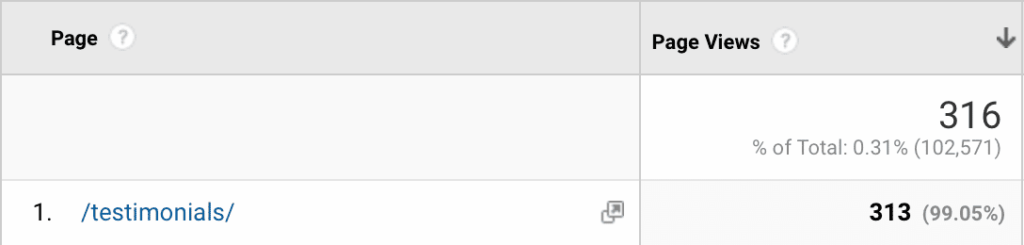
- Don’t have a testimonials page. No-one will read it anyway.
- Check the following graphic. In 12 months, this particular website had 102,517 page views. Only 313 of them looked at the Testimonials page. It makes no sense to have this page or even to have it as part of the main navigation.
19. Use testimonials properly
- Use the best words from your testimonials across all pages on your website.
- Include a great sentence everywhere you want people to do something, e.g. on the contact page, or on the “Request a quote” page.
- Use testimonials everywhere you claim something about your business so that the testimonial backs up your claim.

20. Only talk to one person
- At any given time, only 1 person will read your website. Don’t think in terms of “website visitors”, but think about that one client.
- Speak to them directly, talk about their issues, problems and address their fears.
21. Use Permalinks
- Make sure your page URLs include words, are short but readable and give the reader an indication what a page is about.
- Good example: www.business.com/shoes/red-leather-sandals/
How does your website rate?
- Do the quiz and find out
How many must-have features does your website include?
The quiz has 28 short questions and only takes a couple of minutes to complete.
Find out if you need to improve your website.
Understand web design for small businesses
Planning changes to your website?
This guide explains what actually matters before paying someone to build or redesign it.










