Updated January 2026
Quick summary
A good web hosting provider gives you fast, reliable performance, strong support, and security without breaking the bank. When choosing one, look at uptime guarantees, server speed, customer support quality, backups and security features, storage and bandwidth limits, and pricing transparency. The right host helps your site load quickly, stay online, and rank better in Google.
2026 note on guest blogging and AI tools
Guest blogging is still a valid strategy in 2026 when it focuses on relevance, quality, and genuine collaboration rather than link building at scale. Writing for the right websites can help build authority, reach new audiences, and support long-term SEO.
AI tools such as ChatGPT are best used as research and brainstorming assistants. They can help generate ideas, prompts, and starting points, but they should not be relied on to produce accurate or up-to-date lists of guest blogging websites.
Always manually check that a website is active, relevant to your niche, and genuinely accepts guest contributions. Avoid low-quality sites created mainly for links, as these can harm trust and visibility rather than improve it.
In 2026, fewer high-quality guest posts on reputable sites are far more effective than publishing many posts on unrelated or low-quality blogs.
Why is guest blogging important?
You might wonder what this “guest blogging” is everyone is talking about? Well, it’s pretty simple. Guest blogging is when you write a blog post for someone else’s website or blog.
It’s a great way to get your name and expertise about your product, service, or industry. It can significantly help build your online presence and traffic.
When you guest blog for someone else, you get to share your expertise and ideas with a whole new audience – the blog website readers to whom you’re submitting your blog. Additionally, you’d typically get a backlink to your website or blog, so people can easily find you and check out more of your content. This will increase your online visibility and attract more visitors to your website.
Another significant benefit of guest blogging is making friends with other bloggers and website owners in your niche.
Guest blogging great way to get your name and expertise about your product, service, or industry. It can significantly help build your online presence and traffic.
How to find websites that accept guest posts?
It can be overwhelming to get started, especially when finding sites that accept guest posts. Don’t worry; it’s actually more straightforward than it sounds.
One of the easiest ways to find websites that accept guest posts is to do a Google search. Just type in your niche or industry + “write for us” or “submit a guest post” and see what comes up.
You can also try searching for phrases like “guest blogging opportunities” or “guest post guidelines” to find websites actively looking for guest bloggers.
Also look at the websites of other bloggers or websites in your industry or niche. Check out their “about” or “write for us” pages to see if they accept guest posts. You can also contact them directly and ask if they are open to guest blogging.
You can also look for blog directories or communities that list websites that accept guest posts. These directories and communities can be excellent resources for finding guest blogging opportunities that fit your niche and your goals.
You can also use ChatGPT to help you find guest blogging websites in your niche. All you need to do is “ask” it.

What is ChatGPT?
Have you ever heard of something called “Artificial Intelligence” or “AI”? It’s a fancy way of saying that we can make computers do things that generally only humans can do, like understanding natural language or recognising patterns.
There’s been a lot of talk about ChatGPT and AI software, and the doubters say it will take away jobs. I don’t believe that for a minute. ChatGPT and other AI software models will be a fantastic assistant in the future for all sorts of tasks!
Let’s look at ChatGPT: ChatGPT is a type of AI software designed to understand and generate text. It’s like a virtual writing assistant that can write articles, answer questions, or even write jokes! It sounds super spooky!
Once you have started using it, you will see that it can understand what you are saying and respond similarly to how a human would.
You might be thinking, “Why do we need a computer to write things for us? Can’t we do it ourselves?” And you’re right, we can! However, ChatGPT can help us in many ways. For example:
- Generating a list of guest blogging websites in your niche.
- Summarising an article.
- Even writing an entire blog post on a topic you’re unfamiliar with (caution!!! it’s not always factually correct!).
A few words of caution: Never use ChatGPT to write ALL your content for you. The two main words to take away from this are Assistant & Brainstorming.
ChatGPT is not perfect, and it’s not a replacement for human creativity and knowledge. But it can be a helpful tool for helping us with tasks that are time-consuming or difficult for humans.
How to use ChatGPT to find websites that accept guest blog posts
Now you know what ChatGPT is, let me show you how you can use it to find guest blogging websites. It’s not as complicated as it might seem.
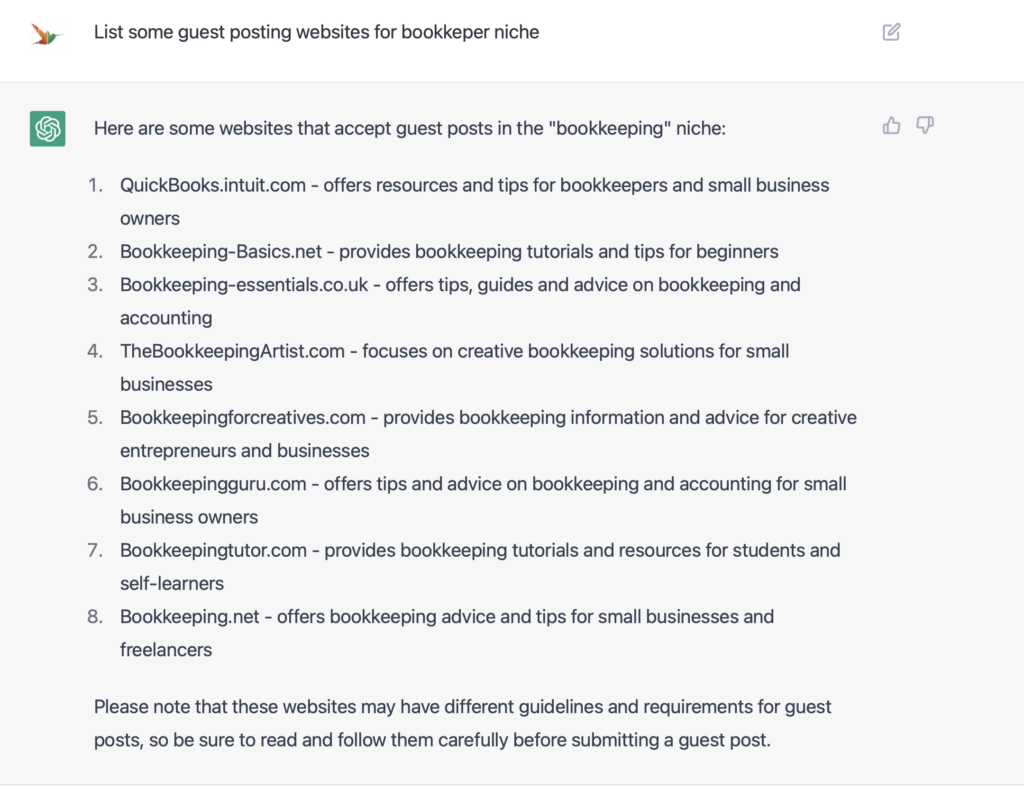
First things first, you’ll need to have a (free) ChatGPT account. Once you have that setup, you can start entering your search query. For example, if you are in the “bookkeeping” niche, you can use a question like “list of websites that accept guest posts on bookkeeping.”
Then, you can use ChatGPT to execute the search query and retrieve the results. You will receive a list of websites that accept guest posts on bookkeeping.
You should then analyse the results. Go through the list of websites and check their relevance, authority, and traffic. You can also check their guidelines and requirements for guest posts. This way, you can identify the most relevant and suitable websites for guest blogging.
Or you can use the magic GPT below and only enter your industry and country and it will do all the work for you 🙂

Use the magic GPT
1️⃣ Make sure you're logged into your ChatGPT account. 2️⃣ Click on the cat. 3️⃣ Enter your industry and your country in the chat field and hit Enter 😻 (E.g.: Wedding, UK) (((You don't need to enter ANYTHING else)))
How to use Google to find websites that accept guest blog posts
Google can provide very specific results. We normally use Google to find answers to our questions or to find a local restaurant. But you can be super specific in Google! I have prepared list of search queries you can use to find guest blogging websites. I have used the bookkeeping example:
- “submit guest post” + “bookkeeping”
- “write for us” + “bookkeeping”
- “guest post” + “bookkeeping” + “blog”
- “bookkeeping” + “guest blogger”
- “contribute” + “bookkeeping” + “blog”
- “become a guest blogger” + “bookkeeping”
- “guest blogging” + “bookkeeping” + “finance”
- “guest post guidelines” + “bookkeeping”
- “bookkeeping” + “guest post opportunities”
- “looking for guest bloggers” + “bookkeeping”
By entering this search query, you will find websites that are looking for guest bloggers to submit posts about bookkeeping.
I recorded a little video that helps you to find websites in Google that accept guest blogging.

How do I ask questions in ChatGPT?
Let’s look at how to ask questions in ChatGPT to get good results:
- Be specific: The more detailed your search query is, the more relevant the results will be. For example, instead of searching for “guest blogging opportunities,” try searching for “guest blogging opportunities for bookkeepers.”
- Use natural language – exactly how you speak: The software is designed to understand natural language. Therefore it’s best to use the same language you would use if you ask a human for help. For example, “list of websites that accept guest posts on bookkeeping.”
- Be clear and concise: Keep your search query short and to the point. Avoid using too much jargon or technical terms that might confuse ChatGPT.
- Include relevant keywords: Use relevant keywords that accurately describe what you are looking for. For example, “guest post,” “write for us,” “submit a guest post”

Use ChatGPT as a writing assistant and for brainstorming ideas!
What should I do with the results from ChatGPT?
Fact checking is really crucial!
- Check for correctness: Verify that the text is accurate and makes sense.
- Verify the context: Be sure to check that the text generated by ChatGPT is appropriate for your business and your intended use.
- Check for bias: Always review the text to ensure that it is unbiased and inclusive.
- Use it as your reference: The content can be used as a reference for your task, whether it is to answer questions or generate text.
Tips for using ChatGPT effectively
- Start with a simple task: Before using ChatGPT, ensure you clearly know what you want it to do. This will help you to better understand the output produced by the model.
- Use natural language: Use words the software understands so it can produce accurate output. You can also use a language other than English.
- Provide a good context: ChatGPT is a context-based model, so providing it with a good context will help it to produce better texts.
- Ask it to use a certain writing style: For example “write casual” or “use a professional tone”.
- Improve provided answers: You can ask it to improve on the provided answers using a different writing style of include certain words. It’s like talking to a person – you’re referring back to what’s just being said.
- Ask it to provide a list: You can ask it to provide a certain number of different answers around the same topic, or ask it to give you 10 different things.