
Updated January 2026
Quick summary
When you redesign your website, plan carefully to protect your SEO by auditing your current content and rankings, keeping important URLs and metadata, setting up proper redirects for any changed URLs, maintaining site speed and structure, and monitoring performance after launch so you don’t lose search visibility or traffic.
If you’re reading this blog post, chances are you know how long it can take to build decent SEO rankings. If you’re now at a stage in your business where you want to redesign your website or ask a web designer to do it for you, there are a few steps to consider before starting the project.
You’re maintaining your business name and using the same domain name
In this article, I outline the elements you should consider when changing your website design.
You’re rebranding and have a new business name and domain
Click the button to find out how to rebrand without losing too much of SEO efforts.
How to redesign your website without losing SEO rankings in 2026
A website redesign can improve your brand, user experience, and conversions. It can also damage your SEO if search engines lose access to your pages, your best content disappears, or your URLs change without proper redirects. The good news: most ranking drops during redesigns are preventable with a clear plan.
Start with a page inventory
Before anything changes, export a list of all current URLs and note what each page is for. Include your top-performing pages, key service pages, blog posts, and any pages that earn backlinks. This becomes your redesign checklist and prevents important pages being forgotten.
Keep URLs the same where possible
If a page is already ranking, the safest approach is to keep the URL exactly the same. If you need to change URLs, use a 301 redirect from every old URL to the closest new equivalent page. Avoid redirecting everything to the homepage because it confuses users and search engines.
Protect your best content
Redesigns often remove content in the name of being “cleaner”. In SEO terms, that can mean removing the very information that made a page useful and rank-worthy. Keep the main topics, supporting details, FAQs, and internal links that help users find what they need. You can rewrite and improve content, but do not strip it back so far that it no longer answers the search intent.
Carry over on-page SEO essentials
Make sure every important page keeps a clear page title, a relevant meta description, a logical heading structure, and image alt text where it adds context. If the redesign changes templates, check that these elements still exist and are editable.
Check indexing settings before launch
It is common for staging sites to use noindex settings or blocked crawling. Before you launch, confirm that the live site is indexable, robots.txt is correct, and important pages are not blocked. After launch, submit an updated XML sitemap in Google Search Console.
Prioritise performance and Core Web Vitals
In 2026, performance is part of protecting SEO. A redesign that looks great but loads slowly can lose visibility and conversions. Pay attention to page speed, mobile usability, and user experience signals. Large images, heavy sliders, and too many scripts can undo the benefits of a redesign.
Keep structured data and rich results in mind
If your website uses schema markup (for example: LocalBusiness, FAQ, Product, Review, or Article), carry it over and check it still works on the new site. Structured data supports rich results in search and helps search engines understand your content more accurately.
Update tracking and monitor after launch
Make sure your tracking is still working after the redesign, including GA4 and Google Search Console. After launch, monitor for 404 errors, redirect issues, indexing changes, and drops in clicks or impressions. Early fixes in the first few days can prevent longer-term SEO losses.
A quick rule to remember
If you change design, layout, and branding, that is usually safe. If you change URLs, remove pages, delete content, or block crawling, that is where SEO problems start. A redesign works best when it improves the user experience while keeping search engines confident they are looking at the same valuable website.
Why a website redesign is risky without considering SEO
- Most SEO losses happen when people redesign their websites without considering their already implemented SEO work or when they change to a new platform (for example, moving from WordPress to Wix or WordPress to Shopify). Different platforms use different URL structures, which can significantly impact your search engine rankings.
- You might consider handing over your website to a designer who does a lovely job redesigning it but does not worry about Search Engine Optimisation.
Here are the top 11 website redesign mistakes that have a negative SEO impact
Here are the top 10 common mistakes made during website redesigns that can negatively impact SEO:
1. You ignore 301 Redirects
Let’s say your About page had this URL on your old website: www.mywebsite.com/about-sally/
Your new website About page now has this URL: www.mywebsite.com/about-me/
Google likely indexed the “about-sally” URL, and if you change it to “about-me” without adding a redirect, people will be presented with a 404 error page on your website. This can cause a significant drop in your rankings.
Also, other websites may link to your “about-sally” page; if someone clicks on this link, they will see a 404 error page.
This isn’t a good experience, so adding 301 redirects for any URL you change during your website redesign is vital. The term “301 redirect” sounds geeky, but it’s super easy. You can use a free 301 Redirect Plugin if you have a WordPress website. If your website is on a different platform, simply head to Google and search for this: “How to add a 301 Redirect on [Your Platform Here]”.
Step 1 before any website redesign should be downloading the existing website sitemap and keeping it safe so that you can add redirects as soon as the new website goes live.
2. You change your URL structure without proper planning
URLs are essential for SEO. Every page URL is a ranking signal and gives a search engine a first glimpse into what a web page is about. For example, if your old website has this page URL: www.mypage.com/red-leather-sandals-women/ (which is great for SEO, by the way), your designer might change it to “/products/women/red/” (bad for SEO).
The URL is displayed in search engine results, and people can see instantly if the page they’re about to click is relevant to their search term. Your original one (“red-leather-sandals-women”) is short enough but long enough to be specific and better for SEO.
Have a look at the following 2 examples from the Google search results:
Bad SEO URL example
Look at the URL that’s displayed below the shop name. It says “collections > women” – this could mean anything.

Good SEO URL example
Look at the URL below the shop name. It says “womens-red-sandals”. This is specific and good SEO.

3. You ignore meta tags
Every page should have a meta title and a meta description. The title should summarise broadly what the page is about, and the description can provide more context. Search engines might use your meta title and description if they consider it good enough. If it’s not, they create one based on your page content.
Adding meta titles and descriptions gives a search engine a little help in the language they easily understand.
At the time of writing (2024), meta titles should contain 50-60 characters, and meta descriptions up to 158 characters.
4. You delete pages that attract a lot of traffic
You might have a blog on your existing website that contains quite old posts, and you are considering removing some of the old content.
You should check Google Analytics and the Google Search Console before removing any pages on your new website, as they may attract a lot of traffic you want to preserve. Unless you’re changing your business direction and no longer want traffic for this topic, be careful to remove old content.
Also, some old pages may have backlinks, i.e., other websites linking to the content. Removing these can significantly harm your rankings.
How do I find pages with lots of traffic?
- Open Google Analytics
- On the left, click on Reports > Engagement > Pages and screens
- Top right, change the date range to “Last 90 days”
- In the table below the graph, in the first column, click on “Page path and screen class” and change to “Page title and screen name”
- In the table, look at the Views column. This should already be pre-sorted from the most viewed pages to the least viewed pages. If not, click on the little arrow beside the word “Views” to sort by most visited.
Watch this video I recorded to see how easily you can find your most visited website pages.
5. You ignore mobile-friendliness
Most of your website traffic will come from a mobile device. Yet, most website designers spend most of their time on the desktop version.
The mobile version shouldn’t be an afterthought but should be tested thoroughly when redesigning a website. If your new site lacks mobile-friendly elements, you can harm your rankings as Google uses mobile-first indexing.
Google “knows” if people can easily access your content on mobile devices. If your site is not mobile-friendly, it will likely drop in the rankings.
As you can see in the example, this website is not optimised for mobile devices. I randomly picked a website from quite far down in the Google search results (page 6).

6. You ignore your website speed
When you employ a web designer to redesign your website, they might urge you to move it to their web hosting. Your existing website might be fast, but their hosting company is not. Ask for websites they developed and the hosting company they use. You can then quickly perform a speed test and see if it matches your existing website speed.
Slow pages can negatively impact user experience and rankings. Google factors page speed into its ranking algorithm, so it is important to optimise images, code, and scripts.
7. Your designer uses a web host that’s not in your country
Inexperienced designers may use a web hosting company they’ve had good experience with; however, the hosting company and server location are abroad.
You want to avoid this at all costs for the following reasons:
- Slower website load times: When the web server is located far away from where your audience is, the data takes longer to travel to your location. This can lead to slower page load times and negatively impact user experience and your SEO performance, as site speed is a ranking factor for Google.
- Negative impact on local SEO: Search engines like Google use server location as a signal when determining local relevance. If your server is located abroad, ranking well in your target country may be more challenging, especially for location-specific searches.
- Potential legal and data compliance issues: Different countries have different data protection laws. Hosting abroad might result in non-compliance with local regulations (like GDPR in the UK/EU), leading to legal challenges and fines.
- Support and time zone differences: If the hosting company is abroad, customer support might operate in a different time zone, making it difficult to get timely help if your website experiences issues.
- Currency and payment concerns: If you pay for hosting in a foreign currency, fluctuating exchange rates can unpredictably increase your costs, leading to budget issues in the long term.
- Security risks: Hosting servers in certain regions might expose your website to higher cyber-attack risks or weaker security protocols. This could lead to downtime, data breaches, or compromised SEO rankings.
- Cultural and language barriers: If the hosting company’s support team doesn’t speak your language fluently, it could result in misunderstandings when resolving technical issues, leading to delays in fixes.
By choosing a hosting company with servers close to your target audience, you ensure faster load times, better SEO rankings, and compliance with local laws, all of which contribute to a better overall experience for users and search engines.
For example, if you’re a cake designer in Kent, you want to use a UK-based hosting company with servers in the UK. Our hosting company has data centres in London, which is excellent for UK audiences.
How can I find out which hosting company my web designer uses?
This is super easy!
- Open a few of their websites, then go to Whois.com.
- Enter the full website URL into the search bar at the top right of the page and click on the WHOIS button.

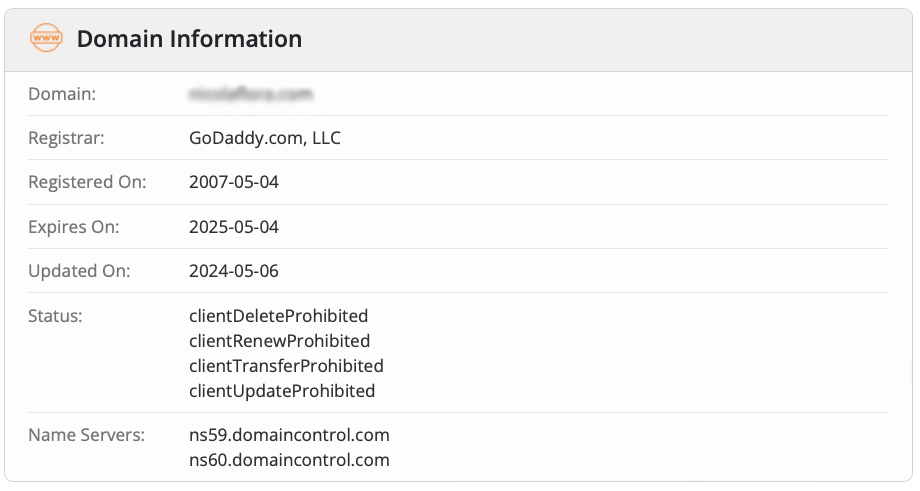
In this case, you can easily see they are hosted on GoDaddy. If you cannot see the information, do this:
- Look at the Name Servers.
- Copy the last part of the nameservers, in this case “domaincontrol.com”
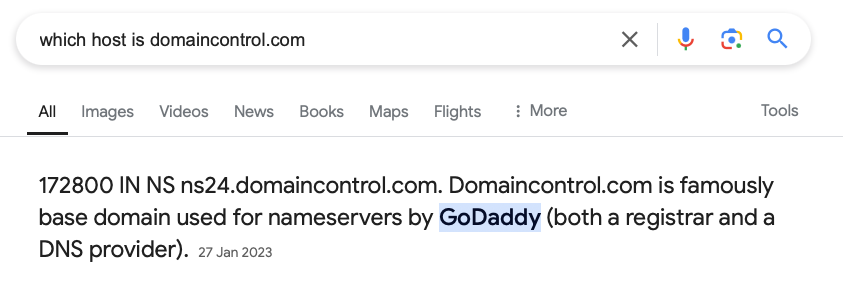
- Go into Google and enter this query: “which host is domaincontrol.com” and Google will tell you straight away.
8. You neglect internal links
Internal links on your website are essential as they indicate to a search engine which pages are significant and have a content connection. Ensure you connect high-value pages by placing internal links.
9. You just copy and paste content without SEO improvements
A website redesign is a fantastic opportunity to take stock of existing content and improve its SEO. Ensure all internal and external links are intact, use keywords in your content and headlines, and avoid duplicating content.
10. You don’t submit your new sitemap to Google Search Console
This only takes 2 minutes. Copy the links to your sitemaps and add them in the Google Search Console (GSC). Google will instantly know that things have changed, and they can start crawling and indexing.
If you have a WordPress website, installing the Yoast SEO or RankMath plugin is a great way to automatically generate sitemaps. You can then open these and get the URLs to submit them to the GSC. If your website is on a different platform, simply open Google and enter “How to find sitemap URL on [Your platform here]”. You will then easily find the sitemap location for your specific platform.
Watch this video I recorded on how to submit a website to Google Search Console
11. You’re not running an SEO audit Post-launch
Free and paid SEO tools allow you to crawl your website and highlight SEO errors, such as duplicate H1, missing ALT text, meta titles and descriptions, broken links, etc.
It’s good practice to run a crawl, audit the new site, and fix all errors as best as possible to give you the best start with your new website.
If you don’t have access to professional tools, you can order an SEO audit from us.
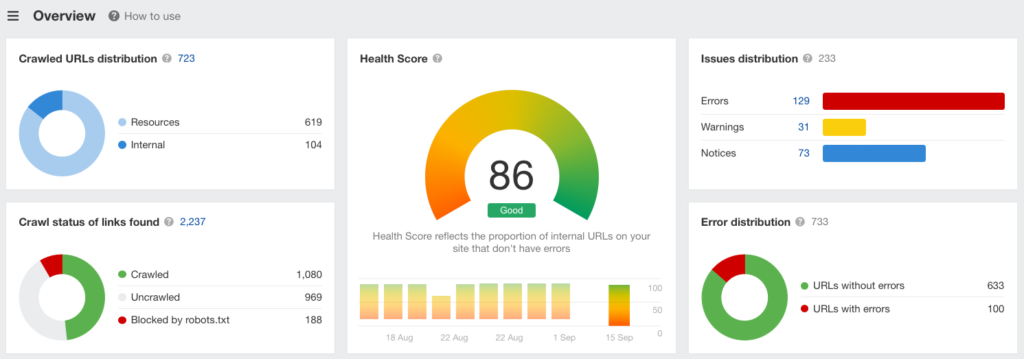
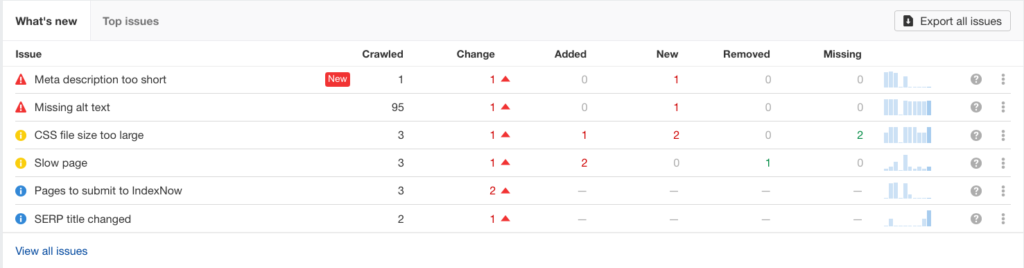
An SEO audit saves you much time as it finds SEO errors quickly. You then step through the list and fix them one by one.
To-do list for your website redesign
- Download all sitemaps and add them to a spreadsheet. This is essentially a backup of all your original URLs. You can then review them and decide which ones to keep, amend or drop.
- Decide which hosting company you’ll use for your redesign. Use the Google Page Speed tool to check the speed of your existing website.
- If your website is already fast and your host is in your country, stay with the same.
- If your website is slow, consider upgrading within the same hosting company (easier than moving to a new host)
- If your host is abroad, consider moving to a host in your country.
- Review your top-performing pages: Identify pages that generate the most traffic, backlinks, and conversions.
- Plan your new website structure: Keep URLs consistent or use proper redirects if changes are needed.
- Improve your website navigation: Show your primary services in your navigation. Don’t hide them in drop-downs.
- Use 301 redirects: Map old URLs to new ones. 301 redirects are essential for preserving link equity and maintaining rankings when URL changes are necessary.
- Run an SEO audit and find and fix 404 Errors. Test all redirects to avoid broken links.
- Update internal links: Check your internal links and update any that may change during the redesign.
- Maintain page speed: Use a website builder known for its speed. (I used to love WordPress Divi, but over the years, it’s become so bloated that I now use Elementor Pro, which is super fast.). Optimise images and remove unnecessary plugins and themes you don’t use.
- Keep metadata intact: During your redesign, preserve or improve meta titles, meta descriptions, alt tags, and heading tags.
- Refresh and improve on-page SEO: Look at how you use keywords on your pages and improve existing content where necessary.
- Post launch: Submit your sitemap to the Google Search Console and Bing and request a new crawl.
Don’t be scared to redesign your website.
Don’t let the above points be reasons you procrastinate. Most of these things are simple to check and maintain and should be second nature for experienced web designers.
If you work with a designer, give them the checklist and ensure they follow it to maintain and improve your website’s SEO.
Don’t hand over the project and forget about it. Keep an eye on your SEO! Your rankings took years to achieve; don’t lose them by ignoring easy-to-implement SEO guidelines.
If you’re looking for someone to redesign your website with SEO in mind, why not send us an email and we’re happy to help.










