
Quick summary
To launch your website quickly without sacrificing quality, plan your structure first, write clear content for key pages (homepage, services, about, contact), choose reliable hosting and a simple theme, optimise basics like mobile-friendliness and site speed, and test everything before you go live. Prioritise essentials over perfection so you can publish fast and then improve as you go.
How to get my website launched quickly: Embrace “Live is Better Than Perfect”
You’re thinking about creating your business website. Web design is exciting (especially the website design process), but for many, it can also be an overwhelming journey, especially if you’re juggling the many different aspects of your business.
The motto “Live is Better Than Perfect” perfectly encapsulates the essence of a successful website launch. Instead of getting caught up in perfectionism, focus on progress and getting your website out there.
Imagine a potential customer is looking for your business in your local area. By having a simply website you have every chance to show up in the local search results and possibly on the Google map.
When you’re right at the start of your website project, there are these things to consider:
- Choosing your domain name
- Chosing a platform for your website
- Choose a hosting provider and hosting plan
In this blog post, I assume you’ve bought your domain name, you selected a web host and have web hosting already in place, and you’ve already decided on a website builder such as WordPress, Wix, Squarespace or Shopify, and now you’re starting to put content together. (If you haven’t chosen a web host yet, I’ve written a blog post here about how to choose a reputable web hosting company for your website).
If you have installed a WordPress website, you can select a WordPress theme which already gives you a good starting point for your website design. There are thousands of free WordPress themes available, but you can also buy a premium theme such as Elementor come with thousands (yes, thousands!) pre-built pages. A theme is like a website template you can pick and then simply fill in the gaps with your own content and images. Website templates are great for beginners as they can really help with the website creation and save you a lot of time. (Learn more about how to get started with your WordPress website in this post.)
If you’re unsure about which website platform is best, here are two interesting things to consider:
- Website builder cost comparison
- Which website builder ist best for SEO (Search Engine Optimisation)
What’s a website builder? You may have come across the word “Content Management System” (CMS). A CMS is like a digital library where you can create, store, and organise your website content (like articles, pictures, and videos) for your website without needing to know complex computer code. All basic website builders are a content management system that allows you to easily organise your website content.
In this guide, I’ll walk you through steps to getting your website launched with confidence and purpose.
First things first – website gimmicks to avoid
It’s easy to get swept up in the allure of designs, gimmicks, animations and many functionalities (you most likely won’t need).
While these elements might initially seem intriguing, it’s essential to keep in mind that at the core of a successful website is your content and the solutions you provide.
Amid the whirlwind of design options and technical features, it’s easy to lose sight of what truly matters to your audience: the valuable content you offer and the practical solutions you present.
Test and monitor yourself when you browse the internet. Let’s say you’re looking for a how-to guide like this one. Would you want every text block to fly in from a different angle? Does a website instil you with calm confidence when you read its content?
When you start working on your website, focus on your website content first and foremost.
Here’s a list of website gimmicks to avoid
- Text animations (the text is typed out)
- Box animations (text blog is slowly appearing when someone scrolls or “flips” into the page – super annoying)
- Images and text fade into the page (this is OK to use occasionally, but not for every image or text block)
- Sign-up blocks slide in and out from offscreen.
- Images are flipped and reveal a message when someone hovers over it (why is this bad? People on a phone don’t have a mouse)
- Buttons that wiggle
- Excessive use of advertising
- Addition of moving memes
- Adding a slideshow for text elements, such as testimonials
Before we dive into getting your homepage launched, let’s look at common beginner mistakes.
Top 19 beginner website mistakes
You’ve never designed a website, so you’ve got quite a mountain to climb. It will be hugely rewarding, but avoid these beginner mistakes and you’ll have a head start.
- Not having a target audience: A “target audience” is the specific group of people you want to reach with your website or message. Thinking about your target audience helps you design and create content that appeals to them.
- Overcrowded layouts: Trying to include too much information or too many elements on a single page can result in cluttered and overwhelming layouts, making it difficult for visitors to navigate and find what they’re looking for.
- Ignoring mobile responsiveness: If your website doesn’t work well on mobile devices, many visitors might have a bad experience. Focus on your content scrolling vertically, don’t hide text behind additional clicks or slideshows.
- Inconsistent branding: Fonts, colours, and imagery can confuse your website visitors and dilute your brand’s identity. It’s essential to establish a cohesive visual identity throughout your website.
- Complex navigation: Confusing navigation menus can frustrate users. Keep your navigation intuitive and organised, making it easy for visitors to find their way around your site. If you only offer 3 services, mention each service in the navigation. You don’t need a service menu for a small number of services.
- Lack of clear Call-to-Actions (CTAs): Provide clear and compelling CTA. Each page should have a specific goal and a corresponding CTA.
- Excessive use of stock images: Don’t rely solely on stock images, which can make your website feel generic and impersonal. Whenever possible, incorporate original images that reflect your brand and content. You can also use AI to generate your own images by using a simple prompt, or you can use Canva to create images by combining graphics and photographs into a new image.
- Poor typography (font) choices: Choosing overly decorative or hard-to-read fonts can impact the readability of your content. Opt for legible fonts and appropriate font sizes. Think about your audience: Is the text big enough to read? Avoid swirly or handwritten fonts for your main text.
- Neglecting white space: Not giving your content enough breathing room can create a cramped and unappealing design. Embrace white space to improve readability and aesthetics.
- Ignoring loading speed: Heavy images and complex design elements can slow your website’s loading speed, leading to user frustration and potential abandonment.
- Not testing your site in different browsers: Different web browsers can show your website differently. Test your site across various browsers to ensure consistency in design and functionality.
- Neglecting SEO: Without considering search engine optimisation (SEO) best practices, your website might not rank well in search engine results, making it difficult for users to find.
- Disregarding accessibility: Ignoring web accessibility guidelines can alienate users with disabilities. Design with accessibility in mind to ensure a wider audience can access and use your website.
- Not planning your website: Designing without a clear plan or structure can result in a disjointed website. Plan on paper before you start playing with designs.
- Failure to proofread: Typos, grammatical errors, and broken links can undermine your website’s credibility. Always thoroughly proofread your content before publishing.
- Large blocks of text: Avoid huge text blocks. People don’t have time to read them. They scan the text and then dive in deeper when they stumble across a section that’s of interest — using bullet lists, headlines and images to make your text flow and user-friendly to read and scan.
- Avoid using meaningless headlines that consist of “marketing speak” instead of actual information
- Social media links in the header: Getting someone to visit your website is an achievement. You don’t want them to immediately click away and explore your social media profiles (and before you know it, they’re away watching cat videos and forget they were exploring your website in the first place). Stick your social media icons in your website footer, and keep them all in one muted colour so they don’t stand out.
- Complex contact forms: You want to get people to contact you, keep your contact form simple. When you get started, all you need are these three fields: Name, Email, Message. Read this guide on how to create an appealing contact form your visitors want to fill in.
Now, let’s get your website on the road…
Step-by-Step guide to launch your website

Step 1: Embrace Imperfection and Launch Your Homepage and Contact Page
Remember, your website doesn’t need to be flawless from the start.
“Digital ink is never dry.” is a phrase coined by Andy Crestodina. Don’t think of your website as a brochure but an ever-evolving project that will constantly improve. I can assure you: your website will look vastly different one or two years after you first launched it.
By launching your homepage and contact page first, you allow Google to start indexing your site. This means your website will become visible in search results sooner, giving you an early advantage. Don’t let the fear of imperfection hold you back – it’s better to have a presence online and refine it over time than no presence.

Step 2: Crafting a Tempting Homepage
Your homepage should immediately capture the essence of your brand and what makes your business unique.
Your website only has seconds to make an impression; therefore, avoid unnecessary messages that convey no information.
Here’s an example of what you could include:
- Your first Message: Tell your visitors exactly what you do, where you do it and for whom.
- Showcase Your Expertise.
- Use high-quality images or graphics.
- Describe your signature product or service: Feature your most important product or service so that people can immediately understand what your business is about.
- Social Proof / Client Testimonials: Include testimonials from satisfied customers to build trust.
- Call-to-Action (CTA): Invite visitors to get in touch

Step 3. The headline test
Many “scan” a web page, looking for the information they’re after. That’s one of the main reasons your headlines should consist of information rather than “flowery” words.
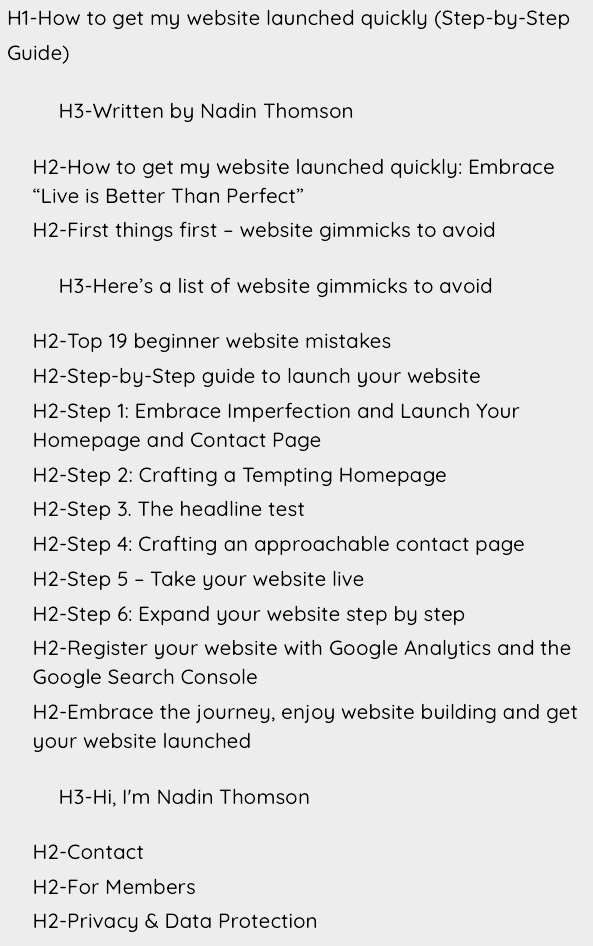
Introducing the “Headline Test”: After you’ve completed your homepage, imagine stripping away all text from your homepage (or any page or blog post on your website), leaving only the headlines. Does the page still convey a clear and precise message about what you do? This test helps ensure that even with minimal content, your website’s purpose and offerings remain evident.
Here’s what this blog post looks like with the content removed and only the headlines in place
Step 4: Crafting an approachable contact page
The contact page is essential for potential clients to reach out to you. Keep it simple and user-friendly:
- Contact Form: Create a simple contact form where visitors can enter their name, email, and message. Avoid the temptation of adding too many fields. Strangers can find this off-putting and you want to get visitors to contact you and not see your contact form as a hurdle to get in touch with you.
- Business details: Include your address, phone number, and email for direct contact. If you work from home and you don’t want to show your address on your website, mention the town and area where you work from.
- Social Media Links: If you’re active, provide links to your profiles. It’s a great way to connect and showcase more of your work.
- Business Hours: If applicable, mention your availability for consultations or order pickups.
Step 5 – Take your website live
Yes, it’s as simple as that!
A couple of things to do immediately after you’ve taken it live (if this is permitted in your country):
- Submit your website to the Google Search Console (this is like telling Google “Look at my website please”).
- Add Google Analytics to your website
- Register your website on Google Business so that it is found locally when someone searches for your business in your area.

Step 6: Expand your website step by step
Now that your homepage and contact page are live, you can gradually expand your website.
Set yourself a deadline for each page you want to add. Don’t say “I’ll do it soon”, instead, say “The About page will be finished by Friday”.
Consider adding the following pages:
- About us: If it’s just you in your business, don’t talk about yourself in the third person. Instead, say, “I do this and that”. Share your story, include a photo of yourself, and mention your achievements, certificates, and any awards.
- Gallery: Create a visually appealing gallery showcasing your products.
- Services: Detail the types of services you offer. Avoid using one service page for all your different products or services. This is important for SEO. Give each service its own page.
- Testimonials: Gather more client testimonials as you serve more customers. Don’t create a testimonials page as such, but use customer testimonials on every page on your website.
- Blog: Share tips, behind-the-scenes stories, and (local) industry-related news.
- Data protection and privacy pages, terms and condition pages.

Register your website with Google Analytics and the Google Search Console
Sounds geeky – but it’s super simple to do. All you need is a Gmail Email account, then head over to https://analytics.google.com and register your website. Do the same for the Google Search Console.
Google Analytics provides information about your website visitors. The Google Search Console provides information about how well your website is performing in Google.
Here’s an article on how to set up Google Analytics on your website.

Embrace the journey, enjoy website building and get your website launched
Especially when you build your own website, the project can seem huge.
How do you eat an elephant? One bite at a time!
How to build your website? One page at a time.
Perfectionism can stall your progress in getting your website launched. Embrace imperfection, launch your website and connect with potential clients sooner.
Prioritise your homepage and contact page, then expand your website over time.










