
Quick summary
A service page is a dedicated website page for one specific service you offer. It explains what you do, who it’s for, what’s included, the benefits, and how to get started: all in a way that helps visitors feel confident booking you. It also helps your website rank in Google for that service, because the page is focused, clear, and keyword-relevant.
Let’s talk about the main page types of a website:
- Homepage
- Service Pages
- Supporting Service Pages
- Transaction Info
- FAQ
- Contact Page
- Blog Posts
- Legal Pages
Let’s look at them and explore what to write on them.
What goes on the homepage?
Have a look at this blog post where I explained exactly what goes on your website’s homepage.
Most people spend a huge amount of time creating their website’s homepage. However, your homepage is not always the first page people see when visiting your website.
Most likely they start reading a blog post or they land on a blog post or a product/service page.
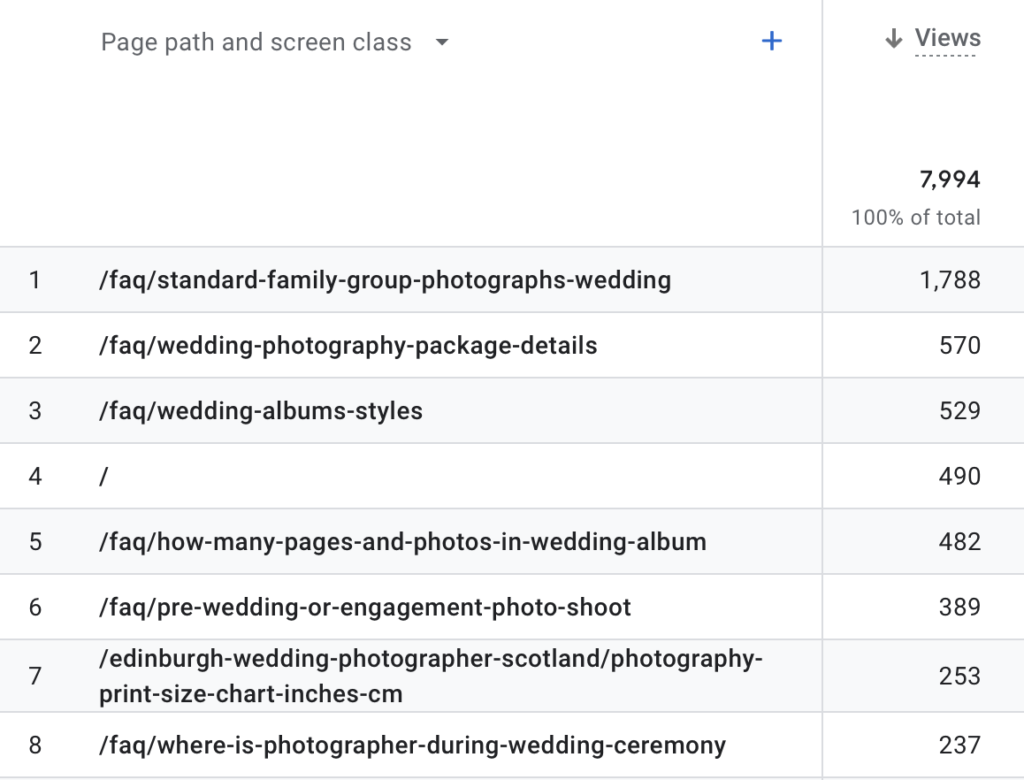
Check out the visitor numbers from my photography website. You can see that the 3 most visited pages are 3 blog posts and the homepage is 4th on that list.
In Google Analytics, your homepage is a single / in the field (see number 4 below).
- Domestic Scaffolding
- Industrial Scaffolding
- Commercial Scaffolding
Your homepage should act like a sign post page that summarises what you do in your business and also gives an overview of the different products/services you’re selling.
In website terms, we call this the “service buckets”.
So if run a scaffolding business, for example, you might offer domestic, industrial and commercial scaffolding, therefore, your “service buckets” would be:
- Domestic Scaffolding
- Industrial Scaffolding
- Commercial Scaffolding
Below each you’d briefly explain what each service is about and then provide a “read more” link which goes to the respective service (product) page.
The main aim of the homepage is to entice people to click on another page! Sounds strange, but that’s it!
Have a look at my our website homepage here. The service buckets are “Web Design, SEO, Hosting” etc.
The main aim of your homepage is to encourage people to click on another page on your website!
What is a service page and what goes on it?
Let’s stick with the above example.
You’re scaffolding services in central Scotland, in particular domestic, industrial and commercial scaffolding.
You need 3 main service pages:
- Domestic Scaffolding
- Industrial Scaffolding
- Commercial Scaffolding
What goes on a typical service page?
At the top of the page, you could have a photograph that clearly shows your area of expertise. For your wedding cake page, you’d show a wedding cake (but NOT a bride & groom!).
Always be SUPER clear in your main header images so that at first glance people see what a page is about.
If you show a couple, your visitor might think they’re on a wedding photographer page.
Be super clear in your main headline (h1) on your service page
If you offer luxury wedding cakes in Yorkshire, for example, use this as your headline. Don’t use “marketing speak” in your headline. Be absolutely clear and say what it is you do and where you do it, i.e.:
- Domestic scaffolding hire in Yorkshire
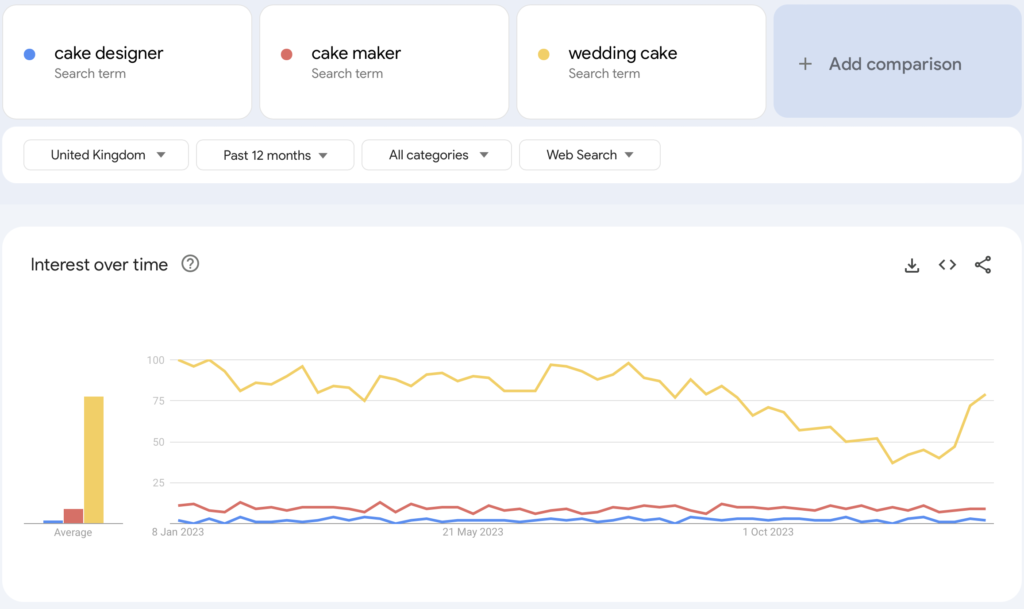
Don’t make your headline about you and who you are, but what your customer is looking for. They’re most likely not looking for a cake designer, but for a wedding cake.
If you’re not sure what your customers are looking for online, you can simply use Google Trends and compare different search terms to get a clear answer based on real Google data.
Check out the following screenshot, taken from Google trends on 12 Jan 2024. I am comparing 3 search terms: cake designer, cake maker and wedding cake.
It’s crystal clear what people search for.

Headline Clarity Checker - Magic GPT
1️⃣ Make sure you're logged into your ChatGPT account. 2️⃣ Click on the cat. 3️⃣ Enter your service page headline into the chat field and hit Enter.
You’re serving different locations in your area
Now you might say you offer cakes further afield, in other areas etc. – there is a way to optimise your website by using location pages. However, before you start with location pages, let’s get your main service page finished first.
Imagine someone visiting your website for the first time and also imagine they don’t know much about your service.
This page is your chance to shine, show your expertise and convince them to get in touch with you.
Let’s analyse a good B2C (Business 2 Consumer) service page and its elements
(I am omitting talking about the navigation and footer here.)
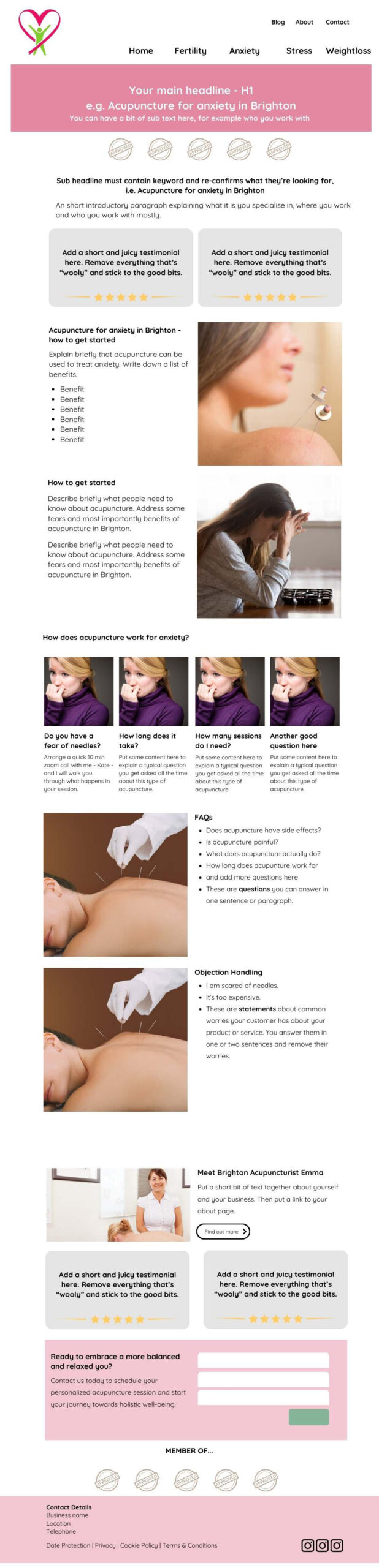
The following elements are crucial:
- Header (including image and H1 headline)
- Sub header
- Trust Proof
- Sub headline
- Intro paragraph
- 2 Testimonials (no slider!! find out why you shouldn’t use a slider here)
- Describe the process of getting this service from you with images and additional information
- A list of FAQs you often get asked about this particular service (this is NOT generic FAQ!!).
- A section where you discuss the 9 most common objections to your product or service. This is called objection handling
- A small “about” section showing a photo of you with a link to the about page.
- 2 more testimonials (no slider!!)
- A super short and simple contact form that allows them to get in touch there and then.
- Trust proof – where are you featured, what organisations are you a member of
PS: Feel free to right-mouse click on the below image and save it for your reference.
What is a good website structure?
As you can see, the above service page links to additional pages.
Let’s stick with the example of a cake designer.
The top-level pages would be:
- Homepage
- Service Page(s)
- About
- Blog
- Contact
Each top-level page can have sub pages. Let’s explore different options.
Example of a cake maker who offers wedding cakes only.
- Homepage
- Wedding Cakes
- Here’s the important part: All of the below are sections are part of this one page!!!
- Flavour Menu
- 3-4 tier cakes
- Minimalistic Cakes
- Small Cakes
- Cake Inspiration
- Portion Size Calculator
- Price Guide
- Here’s the important part: All of the below are sections are part of this one page!!!
- About
- Blog
- All your blog posts answering questions and showing off your work.
- Contact
Example of a cake maker offering wedding cakes, celebration cakes and baking classes.
- Homepage
- Wedding Cakes
- Here’s the important part: All of the below are sections are part of this one page!!!
- Flavour Menu
- 3-4 tier cakes
- Minimalistic Cakes
- Small Cakes
- Cake Inspiration
- Portion Size Calculator
- Price Guide
- Here’s the important part: All of the below are sections are part of this one page!!!
- Celebration Cakes
- Here’s the important part: All of the below are sections are part of this one page!!!
- Cakes for children
- Disney-themed cakes
- Anniversary Cakes
- Cupcakes
- Cake Inspiration
- Price Guide
- Here’s the important part: All of the below are sections are part of this one page!!!
- Baking Classes
- Here’s the important part: All of the below are sections are part of this one page!!!
- Cake decorating
- Baking for children
- Chocolate making
- Here’s the important part: All of the below are sections are part of this one page!!!
- About
- Blog
- All your blog posts answering questions and showing off your work.
- Contact
What does the website URL structure look like?
- /
- /wedding-cakes-yorkshire
- /about/
- /blog
- /blog/the-most-important-keyword-here/
- /contact/
What does the website URL structure look like for the cake maker offering different things?
- /
- /wedding-cakes-yorkshire
- /celebration-cakes-yorkshire/
- /baking-classes-yorkshire/
- /about/
- /blog
- /blog/the-most-important-keyword-here/
- /contact
What should your navigation look like?
Imagine you’re covering up your logo and the header of your website. Can you still understand – just by looking at your website’s navigation – what you’re selling? Bad website navigation example (because we have no idea what they’re selling!):
- Home | Services | About | Contact
 Good website navigation example:
- Home | Wedding Cakes | Celebration Cakes | Baking Classes | Contact
Cover up your logo and the header of your website. Look at your navigation: Is it clear what you're selling?
I love showing the navigation of this shop. You have no idea what the shop is, but the navigation is super clear.

Also note, that the main navigation items should be what your customer is looking for.
The sub navigation (the smaller one at the top) contains links to their about page, FAQ etc.
Don't make your navigation about you. Make it about what your customer is looking for!
Navigation example offering one service in one area

Navigation example offering several service in one area

Do you need a drop-down menu for one service?
If you’re only offering one main service, you don’t need a drop-down menu in your website navigation.
In fact, having one can create unnecessary confusion.
Drop-downs are designed to help users choose between multiple service options. When there’s only one, it’s clearer and quicker to link directly to your service page from the top-level navigation.
A single link with a clear name like home extensions, massage therapy, or career coaching is stronger for both user experience and SEO. It avoids the extra click, keeps your navigation simple, and tells Google this page is important.
Adding a drop-down with just one item can feel like overcomplicating things — and might even make users wonder if your site is unfinished.
Simple, clear navigation wins every time.










