Quick summary
To get readers to stick around and interact with your blog, write in a clear, friendly style, break content into skimmable sections, add visuals, ask questions, link to related posts, and include calls to action (like comments or shares). Make it easy to read and give readers a next step so they stay longer and come back again.
What does “reader engagement” mean?
Blogging is big business and should be part of your content marketing strategy. If you’ve written a blog post, chances are you’ve heard about “reader engagement”. But what does that mean? In a nutshell, reader engagement means to keep your reader actively interested in your content. This is where most definitions end, but I’d take this one step further: Reader engagement not only means keeping your readers actively interested in your content but also encouraging them to read most of your blog post, and they should feel they have learnt something and now have a clear idea of what to do with newly learnt knowledge.
If you write engaging blog posts, your blog audience will listen whenever you publish a new one! You’re not only building brand loyalty but also helping your blog readers on their journey to whatever they came to learn from you.
Why is reader engagement so important?
3 reasons: SEO, Reader Retention, and Increased Conversions.
1. Let’s look at SEO first: You’ve undoubtedly clicked on a link in Google to get an answer to your question. You landed on someone’s blog article, and within seconds, you rolled your eyes… and clicked the “back button of doom” to find a better, more engaging answer!
If people only spend seconds on your blog post, Google takes notice. Google and other search engines “know” that someone only looked at your blog post and then quickly jumped back to the search results. This is bad for Search Engine Optimisation. The more this happens to your readers, the less frequently search engines will show your great content in the search results.
One of the main aims of a search engine such as Google is to provide high-quality content to its readers. If your blog content doesn’t provide reader satisfaction (i.e. engagement), it’s a bad user experience for the blog reader, and that person is less likely to trust their preferred search engine to find the right results.
Google used to have a metric called “Bounce Rate”, which measured the percentage of people who didn’t read your content. They visited your website, but within a few seconds, they clicked the back button. In October 2020, Google Analytics 4 was introduced, and this metric was replaced with Engagement Rate. You can find this metric in your Google Analytics Account. Engagement Rate is a much better metric to show if your readers are engaged with your content.
A “good” engagement rate for business blogs is between 60-70%, and a good Average Engagement Time for a blog post is anything above 45 seconds (Source).
2. Reader Retention. This means keeping people interested in your blog post so they feel like they’ve learned something new and actually enjoyed reading it. They are more likely to bookmark your website or blog, become blog subscribers and might also subscribe to your newsletter because they don’t want to miss out on future publications. In a nutshell, Reader Retention means your readers want to come back and read more of what you write.
3. Increased Conversions. If your readers find your blog post interesting, they are more likely to subscribe to your newsletter, download a PDF, or contact you to work with you.
As you’ll probably notice by now, reader engagement (or blog post engagement). is “big business” as it can positively affect the bottom line of your business!
What will you learn in the next 10-12 minutes?
You’ll learn how to improve your blog writing on your website, what elements impact reader engagement, and the typical mistakes beginners make when writing blog posts. You can also walk away with a checklist for your blog writing so that your existing and new blog posts will be a hit with your readers!
Who is this information for?
You’re a content creator (self-employed or employed) for your business, or you create content for other companies and want to improve your blogging skills.

Tip 1: Why you need to spend time on your blog headline
Let’s get the bad news out of the way first: Only around 20% of readers will read past the headline! (Source) If your headline is bad, people won’t even read your content!Only around 20% of readers will read past the headline!
So, how do you write better headlines?
Here’s a cool statistic: 36% of readers prefer blog headlines with a number (source).
Thousands of blog posts on the internet discuss how to write better headlines. Do a simple Google Search, and you will easily find blog posts that will help you get started. There are even free headline generators available if you struggle with “headline block”.
In a nutshell, according to CXL, these five things will improve your headlines:
- The headline includes numbers.
- The headline has between 5 and 9 words.
- The headline is negative.
- The headline has two parts.
- The headline is crystal clear.
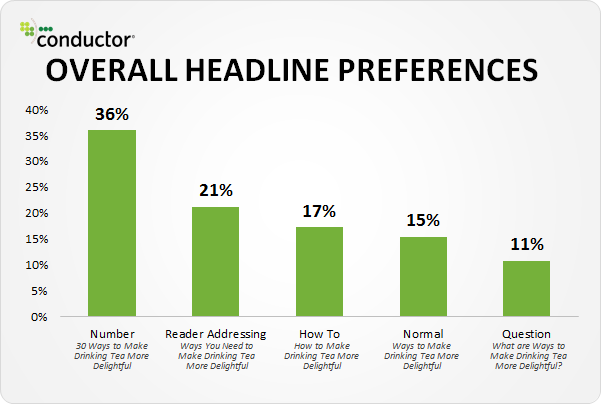
Image Source: Moz.com
Here’s a little tip: DON’T USE ALL 5 ELEMENTS IN ONE HEADLINE!
Here are some blog title generators to get you started:
Some handy tools to improve your blog post headlines:
Tip 2: Why should you use high-quality images and graphics (and stop using bland stock images!!)?
The first rule of thumb is to include an image or graphic every 100-150 words. If your blog post is 1,500 words, it should have 10-15 images/graphics.
Don’t do this: Open Canva or your preferred stock library and randomly download images for your blog post. Or worse, open ChatGPT or some AI image creator, enter “business women networking” and create an image. Don’t do that either!!
Unless you’re skilled in creating entertaining AI images highlighting a point. No one needs another stock photo!
Why do I need an image every 100-150 words?
Images or graphics loosen up the flow of your text. They add context and help your potential readers better understand your content.
Every business is different and there are different ways to ease the flow of your content. I started using this quote style box in my blog posts that highlights a specific point from a nearby paragraph, like this one:
Images or graphics loosen up the flow of your text, add context and help your readers better understand your content.
Where do you get high-quality images from?
OK, so I am going to contradict myself here:
- Canva, or
- your favourite stock library, or
- AI image generators (such as Dall-E, ChatGPT, Midjourney)
However, don’t just download randomly selected images you found for your topic. The images should be topical (not just boring stock images like the ones below.)

And here’s how you can improve this boring stock photo (click through 3 different examples):
But don’t forget to add ALT text with the text you added to an image. Alternatively, use your website’s functionality to add text as an overlay.
How can I improve stock images?
Add stock images to an infographic. You can add text to your image, change the photos, or create a little collage. There are a million ways to improve on just downloading a stock photo. Canva even provides designs you can use. In the above example, the 2nd and 3rd designs come straight out of Canva and took seconds to create – using the same “boring” stock image.
What are the 3 mistakes small business owners make with blog photos?
They forget to:
- Rename them for SEO.
- Optimise the image before uploading it to their website.
- Add ALT tags.
Learn more about how to optimise your images in this blog post.
Don't forget to optimise your images for search engines!
Tip 3: Why you should write as you speak – in a conversational tone
At any given time, only ONE person is reading your blog post. That one person is a human with a particular attention span, interests, life stressors, etc.
So, for the love of chocolate ice cream, speak like you speak when you write your blog posts! Don’t bore your readers.
- Write in a conversational tone (like this blog post). This means I am addressing you – yes, you! – in my sentences.
- Avoid formal language (unless your industry expects this).
Here’s an example of the same paragraph using conversational writing and formal writing:
Conversational writing is a style of writing that makes the reader feel like they are having a friendly and informal conversation with the author. It uses a relaxed chat-like tone and simple language and often includes personal anecdotes to engage the reader. This style avoids overly formal or technical terms, making the content more relatable and easier to understand. The goal is to connect with the reader, making them feel comfortable and engaged as if chatting with a friend.
Now read this same paragraph, but written in a much more formal tone (this is a piece of AI-generated content junk):
Conversational writing is a narrative approach that establishes a personable and informal rapport with the reader. It utilises a relaxed tone and unembellished language and frequently integrates personal anecdotes or rhetorical inquiries to maintain the reader’s interest. This technique deliberately avoids using excessively formal or specialised jargon, thereby enhancing the relatability and comprehensibility of the content. The quintessential aim is to cultivate a connection with the reader, engendering a sense of familiarity and engagement akin to a dialogue with a trusted associate.
🤮
This image was generated using AI. Here it adds a fun context to the above paragraph.
Tip 4: Why you need to break up your text with sub-headlines and bullet points
The whole point of a blog post is for someone to read it – preferably from start to finish (no one ever will, by the way!! Only your boss, your mom or your editor).
That’s why you want to use subheadings and bullet points to avoid boredom and improve readability.
- Don’t use headlines to prettify your blog post. Only use them to structure it.
- Use bullet points for short messages that are easy to scan.
- Every blog post must only have ONE H1 Headline.
- Every subsequent headline is H2. If there are sub sections within an H2 paragraph, you’ll use H3.
A good struture looks like this:
- H1 (your blog title)
- H2
- H2
- H3
- H3
- H2
- H3
- H3
- H2
- H2
43% of readers admit they only skim blog posts. Using headlines correctly helps those only scanning your content.
Source
Tip 5: Encourage Reader Interaction
Oh, the holy grail of blogging – getting the reader to do stuff! Here are things you can do to get them to interact with your content, i.e. do something:- You could end your blog post with an open-ended question, add a comment form and invite your readers to share their thoughts (avoid open commenting to prevent spam!!).
- Invite them to subscribe to your newsletter.
- Use a Call to action in EVERY blog post. Ask yourself, “What’s the point of this blog post?” What would be good for them and good for me? Good for them: They learn something, they get a PDF. Good for me: I build trust with potential clients. I get their email address.
- Create interactive content: Add a quiz, survey, or poll.
- Encourage sharing on social media.
- Host a competition or giveaway: encourage your readers to share your post on social media to participate.
- Publish guest posts.
Tip 6: Include Calls to Action (CTAs)
A Call to Action asks your reader to do a specific thing. Here are a few examples:- Contact us
- Read another particular blog post
- Download a PDF
- Download an ebook
- Buy a book
- Request a quote
- Do the quiz
- Do the poll
Where should I put these CTAs in my blog post?
There’s no specific format that “works” for every blog post out there. You should try out different ways to add CTAs to your blog post, such as:- Adding a regular text link
- Adding a button close to the start of the blog post, and/or in the middle, and/or at the end
- You can add a whole featured CTA, such as the last green box in this blog post, asking you to use the free Google Sheet.
What CTAs did I use in this blog post?
- I suggested clicking on another blog post to learn how to optimise images. I used a simple text link.
- I used a featured CTA at the bottom of the post inviting people to make a copy of a Google sheet that helps them to improve their blog posts.
Tip 7: Why sharing personal stories and experiences is a must
No doubt you’ll have heard of storytelling! If you’re starting out writing blog posts, this might not come to you quickly, but with time and practice, you will get better. Pinky promise! Every good story has a beginning, a middle and an end.- There are millions of blog posts out there that have a super boring start (this is why people don’t keep reading on)
- Lots of blog posts lack substance. There’s no actual story!
- And millions of blog posts don’t have a satisfying end!
Tip 8: Optimise for Mobile Users
Have you been on your phone today? Read much? Mobile first, guys! More people will read your content on a mobile device than on a PC. So please check your content on a mobile device or simulator (such as the LT Browser). Ensure it’s easy to read, your text is big enough and flows well. Don’t believe me? Check out this LIVE statistic from GS Statcounter: Tip 9: Use social proof and testimonials
Social proof is a big subject, but in the context of blog posts, you want to show your new readers that others find your content valuable and trustworthy. This helps improve reader engagement and also builds your credibility online. Here are a few examples of how to use social proof:- When you promote your content, some people reply and comment they enjoyed it. You can include such a comment in your blog posts.
- Include case studies or success stories.
- Include media mentions.
- Include certificates or awards.
- Mention newsletter subscriber numbers or monthly blog readership.
- Include quotes from influencers.
- Include social media shares or follower counts. This can also support your social media marketing when users can share your content to their relevant social media platform.
- Include testimonials.
Tip 10: Most bloggers forget this one thing: Updating Your Content. Regularly!
When it comes to blogging, quality comes over quantity! If you’re a content creator and you’re tasked with writing a specific amount of blog posts every month, you might want to check your earlier posts and see if you can combine or improve some of them to ensure your blog consists of relevant content that helps with user engagement. Here’s why updating your blog posts is important:- Improvement on SEO.
- You make an old blog post relevant again and also improve its accuracy.
- You can boost credibility and trust.
- You have higher conversion rates.
- You can jump on new trends and developments by resurrecting old content.
- Extend your content life span.
- Give your readers better content.
- Gain a competitive advantage by keeping your content relevant and updated.
How to use Google Analytics and the Google Search Console to find opportunities?
Google Analytics and Google Search Console provide valuable insights which blog posts you should be working on!
Here’s a simple tip on how to use the Google Search Console to find “lucky picks”:
- Open the Google Search Console
- Top Left: Click on Search Results.
- Make sure the Average Position tile is ticked.
- Look at the table below the graph and click on the word “Impressions”. Make sure the order is from High to Low. If it’s from Low to High, click on the word “Impressions” again.
- Look at the first keyword that has the most impressions. This is an indicator that A LOT of people search for this keyword.
- Take note of the Average position. If it’s below 20, it’s an opportunity. If it’s above 5 and below 10, it’s a MASSIVE opportunity.
- Click on the keyword.
- Now click on Pages. This will show you the URL of the page or post that is shown in the search results.
- Open that blog post and improve it!
- Every single Google position improvement can mean vastly more clicks.
How to use Google Analytics to find well-performing or underperforming blog posts
Check your Google Analytics and see how your blog posts are performing.- Which ones get the most visitors?
- Which blog post has the shortest session time? (this needs improving!!)
- Which blog post has the longest session time? Can you use a better CTA to convert more readers into subscribers?
- Open the Google Analytics
- Top Left: Click on Reports > Engagement > Pages and Screens.
- In the first column, it says “Page path and screen class” – change this to “Page title and screen name”
- Point your mouse on the column header Average Engagement Time and then click on the little ⬇️ icon that appears to the left of the column title. Sort by highest to lowest (i.e. longest time to shortest time).
- Above the table, change “Rows per page” to 100 to see more results.
- Now look at the blog posts that have the longest average engagement time. These are your good ones!
- Now sort the column Average Engagement Time and by lowest to highest (i.e. shortest time to longest time).
- You will now see your underperforming blog posts at the top of the table.


