Quick summary
Your domain name and your web hosting are two separate things, often bought from different companies. Name servers are what connect the two. Before changing name servers, always back up your existing DNS settings, especially your email records. If you point name servers directly to your hosting company, you can usually get a free SSL certificate. If you only change the IP address instead, you will likely need to pay for one.
This guide is written for small business owners and anyone who manages their own website without a technical background. If you are an IT professional, this probably isn’t for you, but if words like “name servers” and “DNS” have always felt a little mysterious, read on.
Why you need a domain and web hosting
To have a website on the internet, you need two separate things: a domain name and web hosting. People often assume they come as one package, and sometimes they do, but they are actually two distinct services that can be (and often are) provided by different companies.
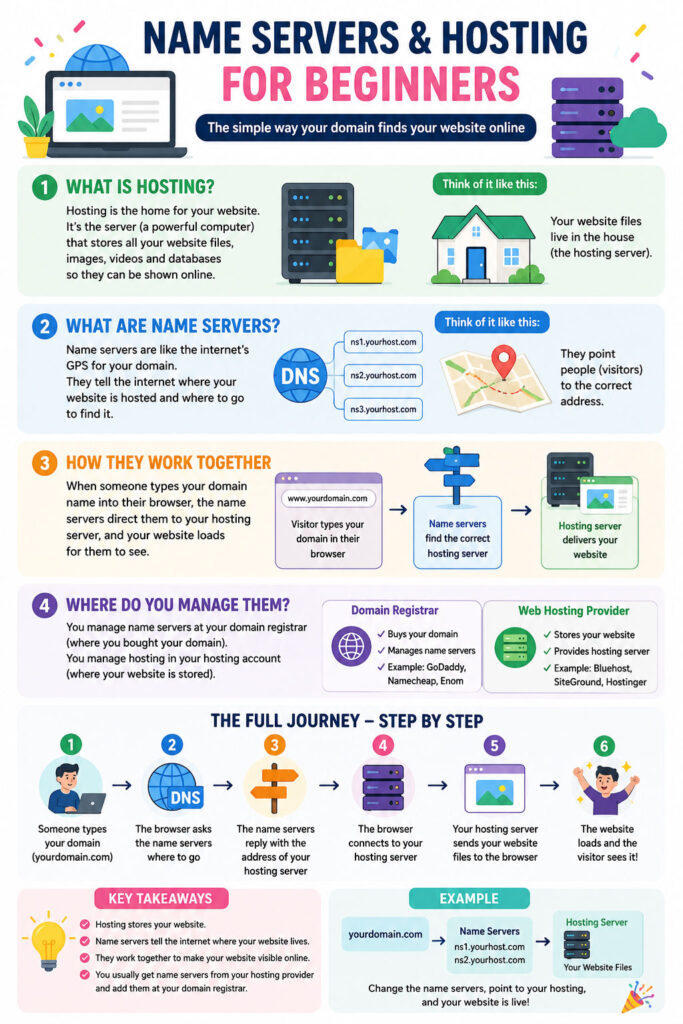
Your domain name is your address on the internet. It’s what people type into a browser to find you, such as yourbusiness.co.uk. Without a domain name, visitors would have to type in a string of numbers to reach your site, which isn’t practical. You register a domain name through a registrar and pay a renewal fee, typically annually, to keep it.
Your web hosting is where your website actually lives. A web host provides space on a server, which is essentially a computer that stays switched on and connected to the internet 24 hours a day. When someone visits your domain, the server delivers your website to their browser. Without hosting, there is nothing to show when someone types in your address.
How much does a domain name and web hosting cost?
Domain names typically cost between £10 and £20 per year for a standard .co.uk or .com address, though some premium or highly sought-after names can cost significantly more. Web hosting varies more widely depending on the type of hosting and the provider. Shared hosting, which is sufficient for most small business websites, generally costs between £5 and £20 per month if you are comfortable managing it yourself. Managed WordPress hosting, which includes more support and performance optimisation, tends to sit between £20 and £50 per month. Some registrars offer free basic hosting bundled with a domain, but these packages are usually very limited and not suitable for a professional website.
It is worth knowing that cheap hosting packages bought online typically do not include any ongoing maintenance. That means security updates, backups, and monitoring are your responsibility. If something goes wrong, you are on your own. At Business Image, our website maintenance service covers the safety, security, and regular backups of your website, so you don’t have to worry about it. We also offer ongoing support for clients who need help with their website, whether that’s making changes, troubleshooting problems, or just having someone to call when something doesn’t look right.
Should I buy a domain name and web hosting with the same company?
It’s perfectly normal for your domain and your hosting to be with different companies. You might have registered your domain years ago with one provider and later chosen a different company for hosting because of better performance, price, or support. It’s also common for hosting to change over time. Businesses move hosts when they outgrow their current package, switch to a more reliable provider, or have their website rebuilt by a new developer who works with a different hosting company.
When your domain and hosting are with different companies, something needs to connect the two. That’s where name servers come in.
Now let’s talk about Nameservers, Registars
If you’ve ever set up a website or had someone do it for you, you’ve probably heard the phrase “name servers” mentioned at some point. Maybe you were told to “change the name servers” or “add a DNS record” without really knowing what that meant. This guide explains the whole thing in plain English, step by step.
What is a domain registrar?
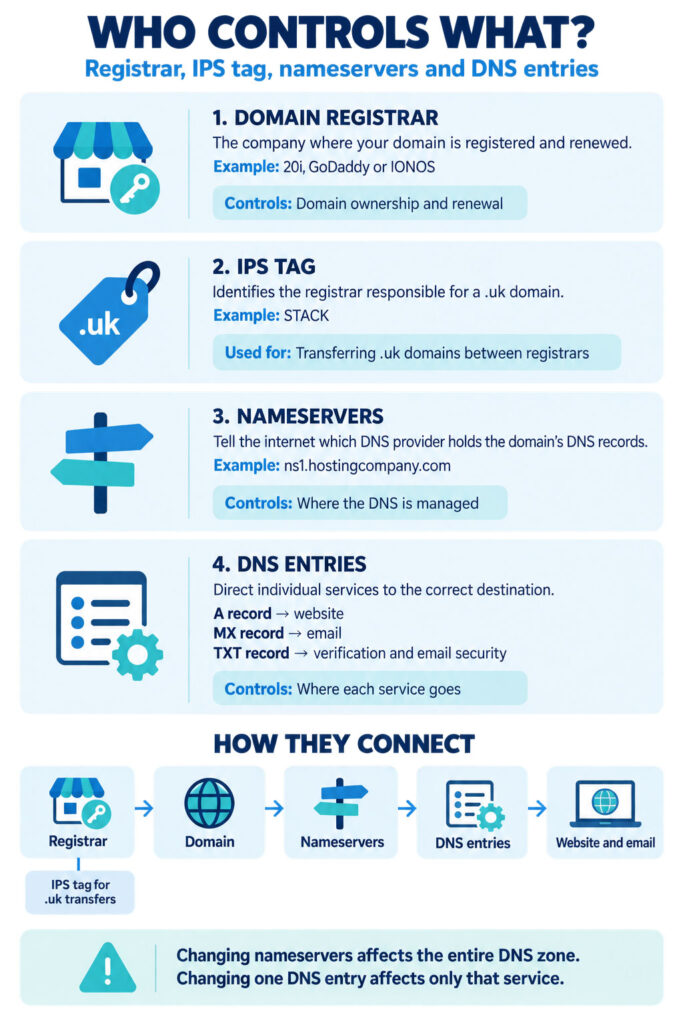
When you buy a domain name (such as yourbusiness.co.uk), you buy it through a domain registrar. A registrar is simply the company that sells and manages domain names. Common registrars include:
- 123-reg
- GoDaddy
- Namecheap
- Heart Internet
- IONOS (formerly 1&1)
- Krystal
Your registrar is where you log in to manage your domain. If you’re not sure who your registrar is, you can look it up using a WHOIS lookup tool. Go to whois.com or lookup.icann.org, type in your domain name, and look for the “Registrar” field in the results.
You normally renew your domain name every year or every two years (or even more years). You will then receive an automatic email or invoice from the registrar so that your domain name is renewed and your website doesn’t disappear overnight. If you don’t pay this invoice, usually there is a small grace period of a few days or weeks, but if you don’t pay on time, then your website might disappear and your emails will stop working. Always make sure that you pay by direct debit or by a card that is active, and make sure that you always have the correct details with the registrar so that the domain name can be automatically renewed every year.
What are name servers?
Normally, you don’t ever have any contact with name servers when your website is built for you. But if you move your website from a previous hosting company to a new hosting company, or you are working with a new web designer, then you may need to know where the name servers are pointing to, and you may need to change them.
Think of the internet as a massive city. Your domain name (yourbusiness.co.uk) is your address. But the internet doesn’t automatically know where your website actually lives. That’s where name servers come in.
Name servers are the signposts that tell the internet: “When someone looks up this domain, send them here.” They point your domain name to the server where your website files, email, and other services are stored.
Name servers look something like this:
- ns1.yourhostingcompany.com
- ns2.yourhostingcompany.com
There are usually two (a primary and a backup), though some providers use more.
Who do name servers belong to?
Name servers belong to whoever controls the DNS (Domain Name System) for your domain. In most cases, that is your hosting company, but it’s not always the same company as your registrar.
Here’s a common example of how it works in practice:
- You bought your domain through GoDaddy (your registrar).
- Your website is hosted on SiteGround (your hosting provider).
- SiteGround gives you their name servers (e.g. ns1.siteground.com and ns2.siteground.com).
- You log in to GoDaddy and update the name servers to point to SiteGround.
Once that change is made, SiteGround is now in control of the DNS (Domain Name Settings). Any changes to where your website or email goes are made inside SiteGround’s control panel, not GoDaddy’s.
It’s always a good idea as a business owner to know exactly where your domain name is registered and also that you have the login details for the website where your domain name is registered, so that you are in control.
How to find your current name servers
You can find your current name servers in two ways.
Option 1: Log in to your registrar. Go to your registrar’s control panel and find the domain management section. Look for “Name Servers”, “DNS Settings”, or “Domain Settings”. The current name servers will be listed there.
Option 2: Use a lookup tool. Go to a WHOIS tool (such as whois.com) and search your domain. Scroll to the “Name Server” section of the results.
What about SSL certificates?
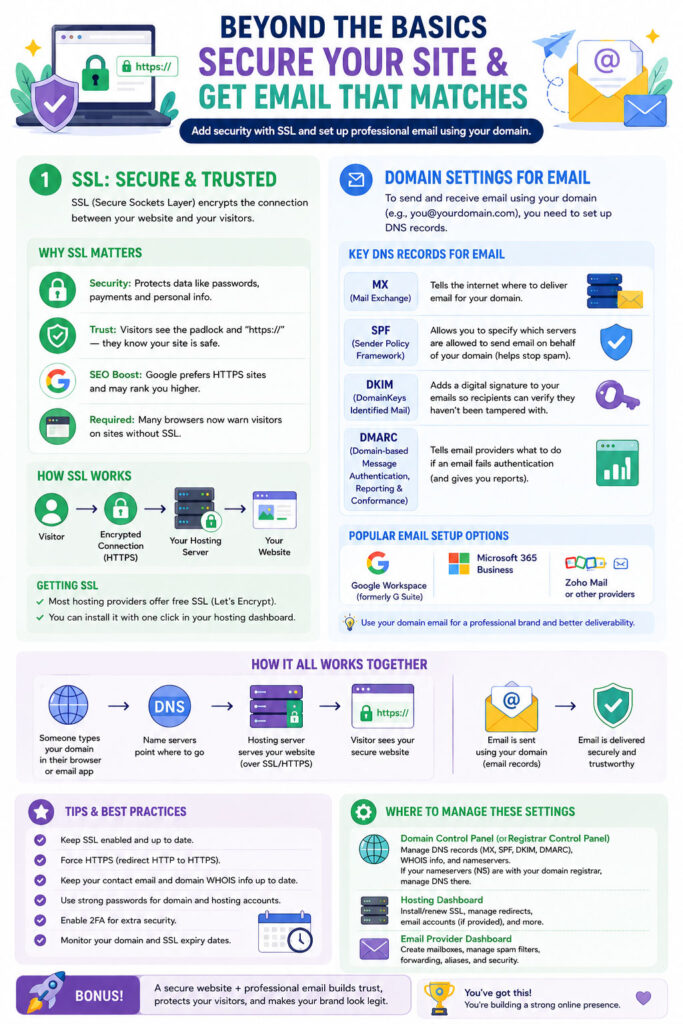
An SSL certificate is what puts the padlock in your browser’s address bar and changes your website address from http:// to https://. It encrypts the connection between your website and your visitors, and it’s now a basic requirement for any website. Search engines treat sites without one as untrustworthy, and browsers will actively warn visitors if it’s missing.
SSL certificates are where the relationship between your registrar, name servers, and hosting company becomes particularly relevant. Most web hosting companies can provide a free SSL certificate through a service called Let’s Encrypt, but this only works smoothly when your name servers are pointed directly at the hosting company. When that’s the case, your host has full control over your domain’s DNS and can issue and renew the certificate automatically without any manual input from you.
If your name servers are pointing elsewhere (for example, they remain at your registrar or a third-party DNS provider) while your website is hosted somewhere different, the hosting company no longer has the access it needs to issue a free certificate automatically. In that situation, you would typically need to purchase a paid SSL certificate, or go through a more involved manual process to verify ownership of the domain before a certificate can be issued. Paid SSL certificates generally need to be renewed annually and add an ongoing cost to running your website.
For most small business websites, the simplest and most cost-effective approach is to point the name servers directly to your hosting company. This keeps everything in one place, allows free SSL certificates to be issued and renewed automatically, and reduces the chance of things going wrong when certificates expire.
Two ways to point your domain to a new server
When you move your website to a new host, or add a website to a domain that was previously not used, you have two options. Neither is wrong; they just suit different situations.
Option 1: Change the name servers entirely
This is the most common approach when you move your website to a new hosting company.
What happens: You go to your registrar and replace the existing name servers with the ones provided by your new host. All DNS control then moves to the new host.
How to do it:
- Log in to your registrar (e.g. 123-reg or IONOS).
- Find your domain and go to its settings.
- Look for the name server section.
- Delete the existing name servers and add the ones your new host has given you.
- Save the changes.
Changes can take anywhere from a few minutes to 48 hours to propagate across the internet. This is called DNS propagation. During that time, some visitors may still see the old site while others see the new one.
Best for: Moving everything (website, email, everything) to a new provider.
A word of caution before changing name servers
Changing name servers might sound like a simple switch, but it’s one of the most disruptive changes you can make to a domain if it’s done without preparation. When you point name servers to a new web hosting provider, you are effectively handing over control of everything connected to that domain, not just the website. If your current DNS has settings in place that aren’t replicated (i.e. copied and inserted) at the new host before you make the switch, those services will stop working as soon as the change propagates.
The most common casualty is email. If you have email addresses set up on your domain (such as info@yourbusiness.co.uk), your current DNS will have records called MX records (email settings) that tell the internet where to deliver your email. If those records aren’t set up correctly at the new host before the name servers are changed, incoming emails will fail to deliver and may be lost entirely. This can happen silently, meaning you won’t necessarily get a bounce notification; the emails simply disappear.
Beyond email, there are other DNS records that may be in place and easy to overlook. These can include:
- SPF and DKIM records, which verify that emails sent from your domain are legitimate and help prevent them from landing in spam folders.
- CNAME records used to verify your domain with third-party services such as Mailchimp, Klaviyo, Google Search Console, or other newsletter and marketing platforms.
- TXT records added by services like Google Workspace, Microsoft 365, or website security tools.
- Subdomain settings, for example if you have a separate booking system, portal, or staging site running on a subdomain of your main domain.
The correct approach is to log in to your current DNS settings and make a complete note of every record that exists before touching anything. Each of those records needs to be recreated at the new host first. Only once everything has been checked, transferred, and confirmed should the name servers be changed. Taking an extra hour to do this properly can save days of disruption.
Option 2: Leave the name servers and change a DNS record instead
Sometimes you don’t want to move everything. Maybe your email is managed through your current host and you want to keep it there, but you want to host your website somewhere else. In that case, you can leave the name servers where they are and just update a specific DNS record.
The record you need to change is called the A record. The A record maps your domain name to a specific IP address (the numerical address of a server). It looks something like this:
- yourbusiness.co.uk points to 123.456.78.90
Your new hosting company will give you an IP address. You go into your current DNS control panel (wherever the name servers currently point) and update the A record for your domain to that new IP address.
How to do it:
- Log in to the control panel of whoever currently controls your DNS (your registrar, or your current host if the name servers already point there).
- Find the DNS management section.
- Look for the A record for your domain (it may be listed as @ or your domain name itself).
- Change the IP address to the one provided by your new web host.
- Save the change.
Again, DNS propagation applies. Allow up to 48 hours, though it often updates much faster.
Best for: Moving only your website while keeping email or other services on the existing server.
One important thing to bear in mind with this approach is that because the name servers remain with a different provider, your new hosting company will not be able to issue a free SSL certificate automatically. You will typically need to purchase a paid SSL certificate through the new host to ensure your website loads securely over https://.
A quick summary
- Your registrar is the company where you registered your domain.
- Name servers tell the internet which company controls your DNS.
- Name servers belong to whoever is hosting your DNS, usually your web host.
- To find your name servers, check your registrar’s control panel or use a WHOIS lookup tool.
- To move your whole website and services, change the name servers at your registrar.
- To move just your website without affecting email or other services, update the A record in your current DNS settings.
Still unsure which option is right for you?
If you have email set up through your domain and you’re not sure how it’s configured, it’s worth checking before making any changes. Pointing name servers to a new host without knowing where your email is set up can cause email to stop working temporarily. When in doubt, get in touch and we can take a look for you.