
Quick summary
How much time you spend on your website each week depends on your goals and stage. Early on, focus on creating and refining key pages, tracking basic performance, and fixing issues. Once live, spend a consistent, manageable amount (like a couple of hours a week) updating content, monitoring analytics, improving SEO, and adding value for visitors. Regular small improvements beat big, rare overhauls.
When was the last time you changed something on your website? Was it when you had it finished and it went live?
Or when you added a blog post a few months ago (or last year)?
It’s only normal to be so busy in your business with everything that’s going on – Social Media, advertising, admin and doing the actual work that the website slides down in your to-do list.
Big businesses work on their website every single day. But they have staff, a whole department to write content, create graphics and optimise things.
It’s much harder for a small business like yours to keep on working on the website regularly.
Working on your website is important for people to see that your business is active and you keep your website updated regularly. We’ve all visited websites when the last blog post was created in November 2016. This doesn’t look good!
Updating your website regularly is also very important for Google and SEO. if you don’t update it frequently, Google is likely to think it’s outdated or you abandoned it. As a result, your website will lose “marks” and is not showing in the top results.
So how much time should you spend on your website every week?
In a way, we all have the same 24 hours, the same 7 days available each week, but we all fill them differently and we all have different demands from our environment (kids, jobs etc.).
I’ve broken down a few tasks for you which can help you keep on top of things with your website – based on how much time you have available.
What can I do on my website in 1 hour per week?
Each point in the list is a 1-hour slot, so try not to do the whole list in one hour 🙂
- Start with the structure of your website. Check out this blog post about what goes on the homepage on your website and start amending it.
- Work on a page by page basis and make sure headlines are used as structural elements on your website and not as design elements.
- Work through your images in the Media Library and check that they are not too large (i.e. bigger than 250 kb per image). Use a plugin such as Optimizely to get the image size down and increase your website speed.
- Check your website speed in Google via this page. If it’s too slow, focus on improving your website speed.
- Check out your existing page headlines – do they include keywords? If not, amend them.
- Work on one page per week and improve it dramatically. Add more content, add benefits and features of your products and services.
- If you have an ecommerce store, improve 3 product listings per week. Add more text, more images, add frequently asked questions for each product.
- Work on your SEO – Check your page URLs – are they SEO friendly? Make sure you create 301 redirects if you amend any existing URLs:
- Are they too long?
- Are they too generic?
- Do they include important keywords?
- Check your website’s performance in the Google Search Console and fix any errors.
- Check if your website has an SSL certificate installed and if not, add one and amend all links to include the “s” in http
- (read the blog “Why you need an SSL certificate on your website“).
- Remove slideshows, simplify your website. Make it super clear what you do and where you offer your services.
What can I do on my website in 2 hours per week?
As above, each bullet point is a 2-hour slot.
- You can work on your link building. Which suppliers do you work with ALL the time? Which suppliers do you love? Do they have a website? Check their website and see if they have a testimonial section that includes a website link. Prepare the testimonial, email it to them and ask politely if they can include it on their website. The more links pointing to your website the better for SEO (Search Engine Optimisation).
- Check your domain rating on moz.com. If it’s very low (less than 5), really hone in on link building (see point 1).
- Update your portfolio, gallery, product section. Add new photos, add new products, and describe your services better.
- Check your Google analytics and see which pages or blog posts perform the best and then either improve them even further or work on the ones that don’t perform as well yet. Work on 1 blog post per week.
- Decide on a blog article and start writing and complete it next week.
What can I do on my website in 4-8 hours per week?
Blog your heart out!
Blogging is THE biggest SEO thing you can do for your website.
But I don’t mean any old blogging. Don’t talk about what you did last week, basically don’t talk about yourself. The blog is not a business diary. The blog should answer – in depth – the questions people ask about your product or service.
Make sure you give the blog a title that people would search for in Google. This does work wonders.
Common titles are:
- Best of
- Common problems
- Price
- Comparisons
- Review
Let me give you two examples for each of the above:
- Best massage for stress relief
- Best therapy for anxiety
- Common problems after sports massage
- Does a sports massage work?
- How much does sports massage cost?
- How much does a blog article cost?
- Blogging vs social media – which is better?
- Reflexology vs acupuncture – which one is better for anxiety?
- Ipad Pro review
- Joiner XYZ New York Review
Also think of the typical questions people ask you all the time.
For me as wedding photographer years ago, people asked these questions constantly:
- How many pages are in a wedding album
- How many photos are in a wedding album
- How much is wedding photography
- What is included in a wedding photography package
I answered all of those questions and tons more on my photography website and consistently ranked well in Google.
The blog posts also saved me HUGE amounts of time. Everytime a potential customer asked me one of the questions, I didn’t have to answer them again, I simply directed them to my well-written blog post.
So what happened after I started blogging?
Nothing.
For 6 months.
Then my numbers blew up and Google started to love my website.
Check the tabs below for the development of the numbers.
Also, bear in mind – at that stage it was only me in my business. I wrote all the blog articles myself. My main goal was to be found in Google by potential customers and be as helpful as possible. At that time, I only wanted to book 20 weddings per year!




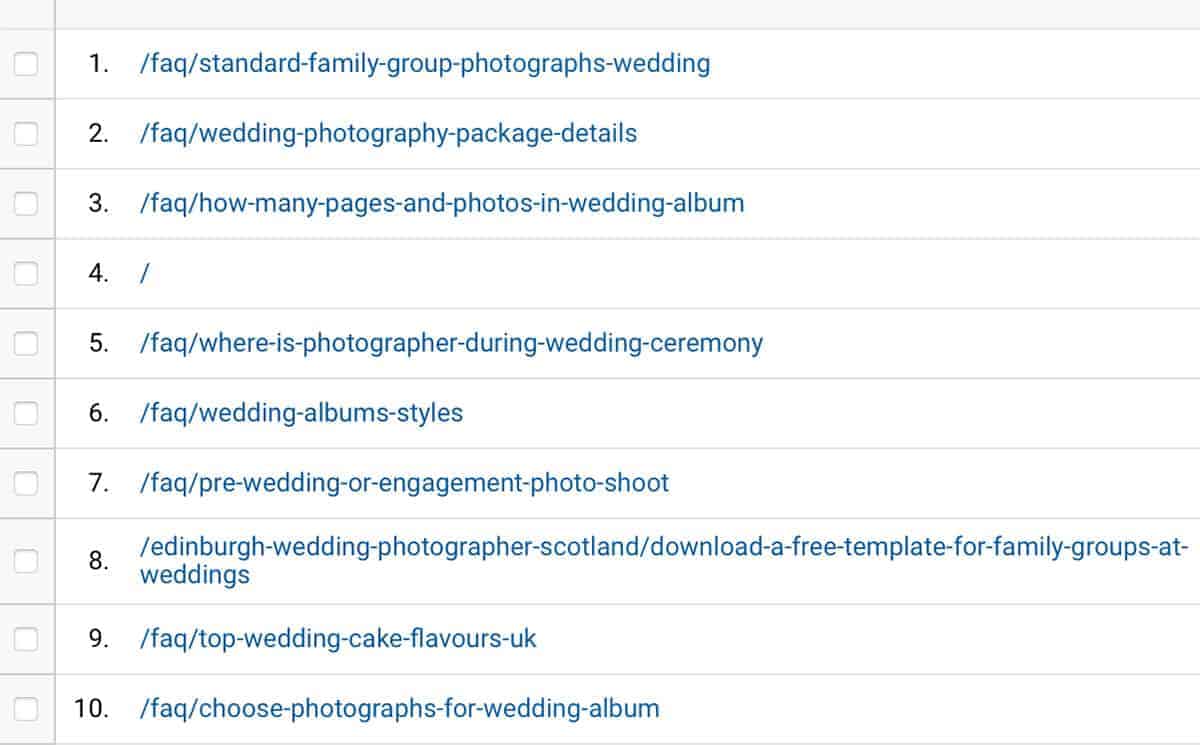
Blogging is THE BEST way to move past the competition in Google and – depending on your competition – you can do this really fast, even if you have a tiny one-person business.
And you know what – I stopped blogging on my photography website about 2 years ago, and the numbers are STILL growing! A blog article is an asset. It’s like putting money into a high-interest bank account. It keeps on paying interest even if you don’t pay in for a while.
The blog post you are reading just now answers a question people often ask: “How much time should I spend on my website”. By simply adding the question here – in the blog post again – I am signalling to the search engines what the blog post is about. I am reiterating the topic.
So how much time can YOU spend on your website every week?
Your website is just one of several marketing channels. Your potential new customers can come to your business through different channels, such as:
- Advertising
- Influencer marketing
- Website
- Word of mouth
- SEO (Google)
- Social media
- Content marketing (blogging)
- Email marketing
- (Personal) networking
- Cold calling
People live online, they have Google in their pocket – the biggest and fastest question answering service in the world.
You can be the one that provides the answers and attract your customers and pull them in by providing meaningful and helpful content to the people who have questions about your product and service.










