
Updated January 2026
Quick summary
Using SEO tools can save time and give useful data, but they also have limitations: they can be costly, sometimes deliver inaccurate or incomplete insights, require learning curves, and may cause overreliance on metrics instead of real strategy — so it’s important to use them wisely as support rather than a replacement for human judgment.
What’s an SEO Tool?
An SEO tool helps you understand how your website is doing on Google. Some show you which keywords people search for, others tell you if your site is too slow, or point out errors. BUT… most are made for pros, can feel confusing, and often try to upsell you.
What’s an SEO Audit?
An SEO audit is like a health check for your website. It scans your pages and gives you a list of things to fix to (supposedly) help you rank better. Sounds useful, but many audits are full of jargon, overreact to small issues, and don’t always focus on what really matters.
The dark side of SEO tools and audits: what no one tells you
If you’ve ever run a free SEO audit on your website and instantly felt like hiding under your desk… you’re not alone.
You thought you were doing something productive. You clicked the shiny button that promised to “scan your website in seconds,” expecting a little to-do list and maybe a virtual high five.
Instead, you got blasted with red warnings, alarming scores, and technical words you’ve never seen in your life.
Welcome to the dark side of SEO tools.
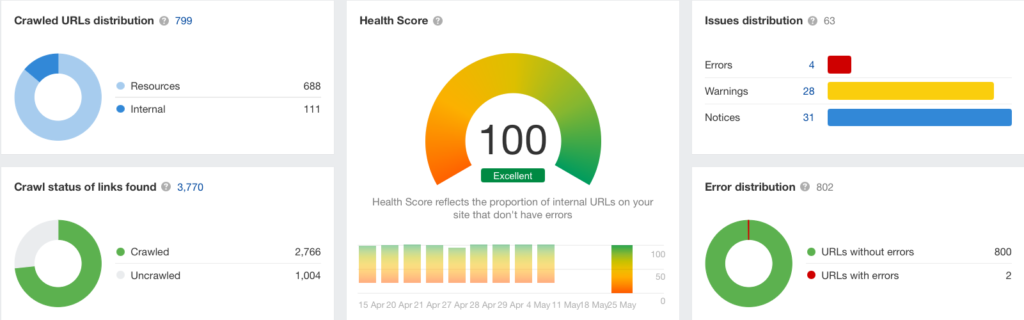
Let’s get one thing straight: it’s not you. It’s them.
Most SEO tools are designed by and for professional marketers.
People who understand what JavaScript rendering means. People who want 48 columns of data in a spreadsheet.
You? You just want your website to show up when people search for what you do. You want more bookings, more enquiries, and to feel confident that you’re on the right track.
But that’s not how most SEO tools are set up.
What you think you’re getting with a free SEO audit
- A helpful checklist
- Simple explanations
- Advice tailored to your small business website
- A little boost of motivation
What you actually get with a free SEO audit
- Panic
- Guilt
- The sudden urge to clean your kitchen instead
Here’s the secret no one tells you about free website SEO audits
Many of these tools are designed to make you feel like your website is broken, so you’ll either pay for their tool… or hire someone to fix a problem that might not even exist.
It’s a marketing funnel, not a public service.
Free tools often only scratch the surface — and they always come with a catch. Most of them will:
- Flag minor issues as major problems
- Use scary red colours to make you feel like your site is in crisis
- Promote made-up “SEO scores” that sound official but mean nothing to Google
When SEO audits do more harm than good
It’s very easy to fall into the trap of:
- Trying to fix things you don’t understand
- Thinking your site is broken because your “score” is 64
- Focusing on random tasks instead of what actually matters
It’s like being handed a car manual when you just wanted to top up the windscreen wiper fluid.
What actually matters when it comes to SEO audits
Here’s what you should focus on instead: the stuff Google (and real humans) actually care about:
- Is your site easy to use?
- Do your pages load quickly, especially on mobile?
- Are you writing clearly about what you do, and who it’s for?
- Are you using real keywords people type into Google?
- Do your pages answer questions your ideal client has?
You don’t need 98/100 on an audit tool. You need a website that makes sense to real people.
A little guide for using SEO tools (without losing your mind)
- Use them as a nudge, not gospel
- If a tool says something confusing, ignore it or ask a real human (like me)
- Don’t obsess over scores — they’re made up
- Stick to Google Search Console for real data straight from the source
- Ask yourself: Does this make sense for my business?
Trust yourself more than the tool
You know your business. You know your customers. And your instincts are probably spot-on.
SEO doesn’t need to feel like some kind of punishment or endless tech loop.
It’s just a way to help the right people find you. So next time you get a scary audit result, take a breath, close the tab, and remember, most of that is noise.
Your website is allowed to be simple, human, and growing at your own pace.
How much do SEO Tools cost?
Tool | Free Plan Available | Starting Monthly Price (GBP) | Notes |
Ahrefs | No | £79.00 | Powerful tool for pros; full access can get expensive |
Ubersuggest | Yes | £29.00 | Good entry-level tool with basic keyword data |
Google Search Console | Yes | Free | Direct from Google – essential for all site owners |
Screaming Frog | Yes (limited) | £0 (limited) / £199 one-off for full desktop app | One-off desktop tool, great for technical audits |
Surfer SEO | Yes (limited) | £19.00 | Content-focused tool, pricing varies with features |
SEMrush | Yes (limited) | £109.00 | Comprehensive tool used by agencies and pros |
Answer The Public | Yes | £9.00 | Good for finding question-based keywords |
SEO tools can be pricey – but there’s good news
Many professional SEO tools like Ahrefs come with a steep monthly fee. And if you’re just starting out, it’s hard to justify spending £79+ a month on something that feels like it’s written in code.
You tell me what you need help with (keywords, backlinks, competitors, etc.) and I’ll run the report for you, explain what it means, and guide you on what to do next.
No scary dashboards. No expensive subscriptions. Just insights that actually make sense.
SEO tools and their limitations in 2026
SEO tools are useful, but they are not a shortcut to better rankings. In 2026, tools are more advanced, more automated, and often powered by AI, but the same core limitation remains: tools provide data and suggestions, not strategy.
SEO tools show estimates, not facts
Most SEO tools rely on third-party data and modelling. Search volume, keyword difficulty, traffic estimates, and backlink metrics are approximations, not exact numbers. These figures are helpful for direction and comparison, but they should not be treated as absolute truth.
Context still matters
A keyword marked as “high difficulty” may still be achievable for a small, well-focused website in a niche market. Likewise, a keyword marked as “easy” may not convert or be relevant to your business. Tools cannot fully understand your audience, location, or business goals, so human judgement is always required.
AI suggestions are helpful, but not perfect
Many modern SEO tools now include AI-generated recommendations for content, keywords, internal links, and technical fixes. These can speed things up, but they are still based on patterns and assumptions. Blindly following AI suggestions can lead to generic content or unnecessary changes if they are not reviewed carefully.
Tools can overwhelm beginners
Even with improved interfaces and onboarding, SEO tools can still feel overwhelming. Dashboards often contain more data than a small business actually needs. Without a clear focus, it is easy to spend time fixing low-impact issues while missing the changes that would make a real difference.
Tools do not replace SEO fundamentals
No tool can replace understanding your customers, answering real questions, creating useful content, and building trust over time. SEO tools support these efforts, but they do not create them. A simple website with clear messaging and helpful content will often outperform a technically perfect site with no clear purpose.
The best way to use SEO tools
SEO tools work best when used as guides rather than rulebooks. Use them to spot patterns, track progress, and identify opportunities, but always filter the data through your business goals and common sense. In 2026, the most effective SEO still comes from combining good tools with clear thinking and consistent action.
What does it all mean?
A beginner’s guide to the jargon SEO tools throw at you
Content
No matter how many tools you use, SEO will never work without one thing: quality content.
That means writing helpful, clear pages that answer your customer’s questions. No keyword can save a boring website; your content needs to be genuinely useful.
Tip: Write like you’re explaining things to a friend, not Google.
Backlinks
A backlink is when another website links to yours. Google sees that as a vote of confidence.
The more trusted the site linking to you, the better.
But don’t panic if you don’t have any yet — it’s something that grows over time.
Meta Tags
Meta tags are little snippets of code that describe your page.
The most important ones:
- Meta title – what shows up in Google results
- Meta description – the short blurb under your title
Tools often nag about these being missing or too long. But they’re easy to fix and great for click-through rates.
SEO Tools for beginners
Let’s be real — most SEO tools are not made for beginners.
They assume you know what canonical tags and crawl budgets are.
Don’t feel bad. You’re not behind. The tools are just not made for you.
That’s why guides like this one exist. You’re doing great.
User Intent
This is a big one.
User intent means: what is the person really looking for?
Are they researching? Ready to buy? Looking for info or services?
Good SEO matches content to intent — so the searcher feels like “Yes, this is exactly what I needed.”
Keyword
A keyword is what someone types into Google.
But it’s more than a word – it’s a clue to what people need.
Instead of guessing, use tools to see what real humans search for.
Tip: Long, specific keywords (aka “long tail”) are often best for beginners.
SEO Tools
If you want to peek behind the SEO curtain, here are some popular tools (just don’t let them boss you around):
- Ahrefs – powerful but pricey
- Ubersuggest – more beginner-friendly
- Google Search Console – a must-have
- Screaming Frog – advanced, but helpful
- Surfer SEO – focuses on content scoring
- SEMrush – big tool for big users
- Answer The Public – great for keyword ideas
What is Technical SEO?
Technical SEO is all about the behind-the-scenes stuff: how fast your website loads, if it works well on mobile, if search engines can crawl it.
Tools love shouting about technical SEO issues, but not everything flagged is urgent.
Start with basics: fast loading, working links, and no pages that go nowhere (404s).
SEO Metrics (and what they mean)
SEO tools often throw scary metrics at you like:
- Domain authority
- Page speed score
- Keyword difficulty
- Spam score
- Bounce rate
Don’t worry. Most are just indicators. Not every metric needs fixing — especially if your customers are still finding you.
Search Volume & Traffic
Search volume tells you how many people are Googling a specific keyword per month.
Website traffic is how many people visit your site.
Big search volume ≠ big success. It’s more important to match the right people with the right page.
Competition
Every keyword has competition.
If you’re a small business trying to rank for “wedding cakes” you’re up against big-budget bakeries.
Instead, go for something like “wedding cakes in Perth Scotland” — more specific = more chance to be seen.
Workflow
Getting the hang of SEO means building a simple workflow:
- Do your keyword research
- Create helpful content
- Add keywords to key places (title, intro, headings)
- Share it
- Monitor how it performs
- Repeat. Tweak. Grow.
Broken Links
Tools love to flag broken links — these are links that go nowhere or show a 404 error.
They can annoy users and hurt your SEO.
Check your site every few months or use a free tool to spot and fix them.
Request a local SEO audit
Get a clear view of how your website and local visibility are performing, what’s holding things back and where improvements would actually make a difference.










