
Quick summary
Removing spammy backlinks helps protect your website’s SEO by improving your link profile and avoiding penalties; you do this by identifying low-quality or harmful links with tools, trying to get them removed by contacting site owners, and if that fails using Google’s disavow tool so search engines ignore them.
What to do when spammy websites link to you
Spammy backlinks are common and usually nothing to worry about.
Most small business websites will get the odd dodgy link, and Google is smart enough to ignore them. You can check your backlinks using Google Search Console and tools like Moz (look out for spam scores). Only take action if there’s a big spike in bad links or you’ve had a manual penalty. Otherwise? Ignore them and focus on building genuine, quality links instead.
So… you’ve been poking around your SEO tools (or maybe just had a little look in Google Search Console) and you’ve spotted something odd.
A bunch of random websites are linking to yours. Some look fine. Others? A bit… dodgy.
The domain authority (DA) numbers are low. You’ve never heard of these sites. One of them might even be in a different language. And now you’re wondering — is this bad for your SEO?
Let’s break it down.
What are spammy backlinks?
A backlink is simply a link from someone else’s website to yours. In theory, the more quality backlinks you have, the better for your SEO. But like anything in life (and on the internet), not all backlinks are created equal.
Spam backlinks come from websites that are low quality, irrelevant to your business, or just plain shady. Think:
- Random foreign blogs with gibberish content
- Sites stuffed with ads or AI-generated nonsense
- Old directories or link farms that exist purely to sell SEO juice
Some of these sites might have a low domain authority (DA), but low DA doesn’t always equal spam. A brand-new but legit blog might have a DA of 13. A dodgy link farm could have a DA of 40+. So it’s not just about numbers — it’s about context.
Why are they linking to me?
Here’s the good news: most of the time, it’s not personal.
Spammy backlinks are often generated by bots or scraping tools. They might be copying content, automatically pulling in links, or just linking out to random pages to look more “real.”
In short — it happens to everyone. Even big-name websites get spammy links.
How to find out if you’ve got spammy links
Start with Google Search Console (it’s free and your best friend when it comes to SEO insights).
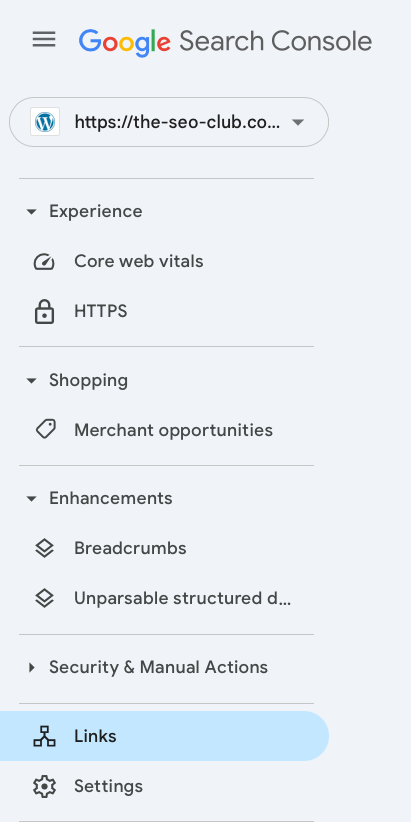
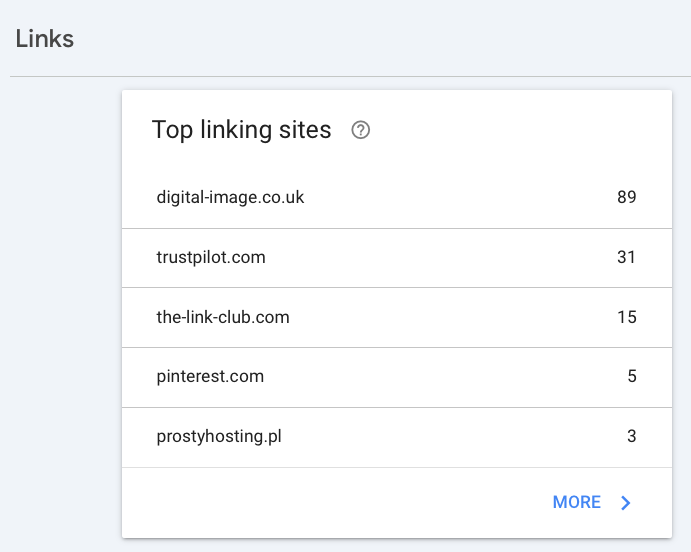
- Go to Links > Top Linking Sites
- Have a scroll through. Spot anything strange? Make a note.
Next, try the Moz Domain Analysis tool (also free – just search for it online).
- Paste in the linking domains and check their Spam Score
- A spam score of 1–30% is normal. Higher than that? Could be worth a closer look
- Don’t panic if a site has a high score but only links to you once – context matters
You’re looking for patterns:
- Are the links totally unrelated to your business?
- Are they coming from sketchy-looking domains or foreign sites?
- Are there lots of them suddenly appearing at once?
If it’s just a handful of odd ones here and there, it’s probably nothing.
Do spammy links hurt my SEO?
Short answer: not usually.
Google is smart. It knows there’s a lot of nonsense on the internet. Their algorithm is designed to ignore dodgy links unless you’re actively trying to cheat the system.
So if you’re minding your own business, building your website properly, and suddenly find a few spammy sites linking to you — don’t panic. Google probably isn’t even counting them.
When should you take action?
Most of the time, you can just ignore spammy backlinks. But there are a few scenarios where it’s worth paying closer attention:
- You see a sudden spike in spammy links over a few days
- The links are coming from adult, gambling or malicious websites
- Your traffic has dropped and you’ve ruled everything else out
- Google Search Console shows a manual action penalty (very rare)
If that’s the case, you may want to investigate further or chat to an SEO expert.
What can You actually do about it?
First, keep an eye on things.
- Keep checking Google Search Console every month or so
- Use tools like Moz or Ahrefs to spot any strange patterns
If you’re genuinely worried and want to do something about it:
- You can use Google’s Disavow Tool to tell them to ignore certain links
- But warning: this tool is for advanced users. Used incorrectly, it can do more harm than good. Only use it if you’re sure the links are causing problems
If you’re unsure, it’s always best to get a second opinion. You don’t need to go full detective mode over one dodgy backlink.
Spammy backlinks happen.
They’re part of life on the web, like junk mail through your letterbox.
Unless you’re deliberately buying backlinks or doing something shady, Google’s not going to hold the odd spammy link against you.
Focus your energy on what does matter:
- Creating useful content
- Getting mentioned on relevant blogs and directories
- Building a site that search engines trust
Link quality and removal advice for 2026
Unnatural or spammy backlinks can still affect how search engines view your website, but modern algorithms place more emphasis on the overall context and relevance of links rather than just counting them. A strong backlink profile is one made up of relevant, authoritative, and naturally earned links.
Use Google Search Console and tools to audit links
Google Search Console remains the primary place to see who links to your site. In GSC, you can review referring domains, download your link list, and spot unusual spikes or irrelevant sources. Third-party tools like Semrush, Ahrefs, and Moz also offer backlink analysis that highlights potentially low-quality links using AI-assisted scoring.
Identify truly problematic links
Low-value links often come from irrelevant directories, link farms, spam comment sections, paid link networks, or sites with no real content. Don’t remove links just because they look low quality in a tool — focus on links that are clearly unrelated to your niche and unlikely to have been earned naturally.
Disavow with care
Google’s disavow tool still exists and should be used only when you believe a significant number of unnatural links are harming your SEO or when you have received a manual action notice. Disavowing links tells Google not to count those links when assessing your site’s authority, but it should be approached cautiously because it can also exclude good links if misused.
Regular backlink monitoring is best
Rather than waiting for problems, incorporate backlink reviews into your regular SEO routine — quarterly or biannually. This helps you spot trends, protect your domain authority, and focus on earning valuable, relevant links instead of just removing the bad ones.
Focus on earning good links too
One of the most effective ways to improve your link profile is by creating useful, high-quality content that others want to link to. When your site naturally attracts contextual links from authoritative sources, those good links outweigh a handful of irrelevant ones and reduce the need for clean-up.
FAQs around spam backlinks (bad links)
What’s the difference between a spammy backlink and a good one?
A good backlink comes from a trustworthy, relevant website. A spammy backlink often comes from low-quality, irrelevant, or shady-looking sites.
How do I check my backlink profile?
You can use Google Search Console (free) to see which websites are linking to you. Tools like Moz or Ahrefs can give you more detail, including domain authority and spam score.
Do I need to use the Disavow Tool?
In most cases, no. The Disavow Tool is for advanced users and only needed if harmful links are genuinely affecting your rankings. Used wrongly, it can hurt your SEO.
What are unnatural links?
Unnatural links are backlinks that violate Google’s guidelines. They often come from link schemes, paid links, or manipulative tactics meant to trick search engines.
Can harmful backlinks hurt my SEO?
A few spammy links usually won’t hurt you. But if there’s a big spike in bad links or you're actively involved in dodgy link building, they can cause issues.
What makes a link “high quality”?
A quality link comes from a relevant, trusted site that makes sense for your content. It often includes natural anchor text and adds value to the reader.










